
Posted by Pradeep | Posted in Internetmarketing, Social Media, Techniques and Resources | Posted on 4:16 AM
 10 Ways Social Media will Change in 2010
This time last year, I wrote about the 10 ways social media will change 2009, and while all predictions have materialized or are on their way, it has only become clear in recent months how significant of a change we've seen this year. 2009 will go down as the year in which the shroud of uncertainty was lifted off of social media and mainstream adoption began at the speed of light. Barack Obama's campaign proved that social media can mobilize millions into action, and Iran's election protests demonstrated its importance to the freedom of speech.
Today, it is impossible to separate social media from the online world. Facebook reached 350 million users last month -- 70% of whom are outside the US -- and it accounts for 25% of the Web's traffic, nearly one in five people on the web use Twitter, and 94% of enterprises plan to maintain or increase their investment in enterprise social media tools. The social media conversation is no longer considered a Web 2.0 fad -- it is taking place in homes, small businesses and corporate boardrooms, and extending its reach into the nonprofit, education and health sectors. From feeling excitement, novelty, bewilderment, and overwhelmed, a growing number of people now speak of social media as simply another channel or tactic.
So what will social Web bring next? What will "being connected" mean? What will the next experience be for the 2 two billion people who are connected to the Internet? Here are 10 ways what we've called social media will evolve in 2010.
1. Social Media Will Become a Single, Cohesive Experience Embedded In Our Activities and Technologies
By this time next year, social media will no longer be "social media" -- it will be an integrated, unquestionable component of your online and offline experience. Last year we spoke of cross-platform integration across media sites. Open APIs and OpenID made that possible, and even LinkedIn announced last month that it too will finally open its APIs. 2010 will be about integration and a single, cohesive experience across platforms as well as across products and devices -- Web, mobile, TV, and video -- will become near-inseparable experiences.
Users will access content from any device or platform, co-create and mashup their photos, videos and text with traditional content while interacting with each other. Publishers will create new kinds of content for the connected world, and the last years' lull in good entertainment will finally be lifted. This trend will cut across all of our activities -- from playing games to shopping to emailing and texting -- nothing will be lost; everything we do will be gathered and streamed together, allowing people to view their world of activities as if it were projected in front of them, open to change, review and input at any point in time from any device or online tool.
2. Social Media Innovation Will No Longer Be Limited By Technology
With Web technology maturing and the near-elimination of previous barriers such closed platforms and discrete logins, companies will now look to innovate the way they use existing technology, rather than focus on technology enhancements themselves. We will see a move to leverage existing assets -- content and capabilities -- in new ways, turning information to wisdom and insight to action. Whereas once user research required focus groups and usability tests, companies will utilize the Web's capabilities to achieve the same. Naturally occurring conversations will be utilized in product innovation and design, and companies will create incentives for people's attention and engagement while repurposing and analyzing content and engagement in new ways that will deliver valuable input.
3. Mobile Will Take Center Stage
Worldwide, the iPhone alone accounts for about 33% of mobile web traffic and IDC predicts the number of mobile web users will hit one billion by 2010. As the technological barriers come down, people will increasingly use their phones on-the-go to access social networks, search, read content and find location-based information. Our phones will be used as a central hub and beacon -- enabling a slew of new capabilities and experiences.
4. Expect an Intense Battle As People and Companies Look To Own Their Own Content
2009 marked the year of open Web, and divergence of content, making content available anywhere, anytime, by anyone and to everyone; it was the year content exploded across the web, platforms and devices. The issue Google solved so magically -- content find-ability -- will become all but moot in the coming years. Instead, content relevance and quality will become the key focus. In 2010 we will start to see convergence as companies take measures to own their own content, its location and its cost. Last month, Rupert Murdoch announced he may opt News Corp out of Google, instructing it to de-index its publications from the search engine and giving exclusive rights to Bing for a fee. This means that content publishers will be able to determine where they make their content available and at what cost.
With the growth of user generated content and the dwindling relevance of search results, people will gradually shift their trust from large aggregators like Google, Microsoft and Yahoo, and move to searching and finding content at specific locations and, eventually, creating and integrating their own content hub into the rest of their personal digital experience. "People don't realize that everything they do -- on Facebook, Ning, Google and with their credit cards -- is being collected, tracked, analyzed, owned and monetized by these companies who provide (so-called) free services. It's not a healthy model." Says John Faber, COO of af83, a Drupal development house and co-founder of the upcoming DrupalCon.
5. Enterprises Will Shape the Next Generation of What We've Called "Social Media"
It was easy to forget that enterprises and large institutions are the originators of some of social media's pillars: listservs, forums, intranets and collaboration tools. As social media became a public domain, enterprises have been cautious participants, predominantly in the product space, with few visionary leaders like Zappos, IBM and Dell. But cautionary they are no more. With a reported average of 25% increase in funds allocation toward social media activities, in 2010 we will see a surge in adoption of social media across product, services and solutions companies.
Having the need and the funds, enterprises will determine the next generation of social experiences. They will push enhancements that meet their needs, specifically around monitoring, automation, alignment with the sales cycle and integration with existing systems, expanding social "media" to encompass the ecosystem of social computing across solutions, and making them actionable for the company. Jive, blueKiwi, Remindo and Sharepoint support companies internally. Most recently, Salesforce.com released Chatter, designed to turn the corporation, and CRM, social. With its APIs opening later this year, "Chatter can become a new layer over its Force platform, already being used by 68,000 customers, enabling companies and developers to leverage the Salesforce infrastructure in a secure environment," said Bruce Francis, VP corporate strategy Salesforce.com.
6. ROI Will Be Measured -- and It Will Matter
Return on investment on social media activities has been challenging to most companies this year. Surveys show only 18% of companies say they saw meaningful return on investment from their social media activities while the other 72% report modest, no return or inability to measure the return on their investment in social media. While the definition of ROI is evolving to better fit the world of relationships and networks, the ability to demonstrate ROI in hard numbers -- not in followers or fans -- will become a baseline business requirement in 2010. Already, both traditional firms and startups are working feverishly to demonstrate they can turn hype into science. But, only those companies who will be able to analyze and predict hard returns on investments will last.
7. Finally: Real, Cool and Very Bizarre Online-Offline Integration
Virtual worlds, games and avatars were just the beginning of the online-offline integration. In 2010 we'll see a greater push on this front as distance and physical walls will matter even less. Augmented reality -- already integrated into Yelp's latest geo-tagging enabled application -- will allow users to find relevant information and people depending on their location; Twitter360 will help people find each other, connect and see updates by location all while on the go through their mobile device. People will be able to scan products on shelves but process the sale online; you'll never need to ask for a business card again at events -- and you may actually get promotions and discounts that match your interests.
8. Many "Old" Skills Will Be Needed Again
An economic downturn coupled with the surge of social media eliminated many traditional marketing and PR roles. But this year, we'll see the return of professionals to the field. Enterprises will turn back to marketers who specialize in understanding customer psychology and who are experienced in addressing these both offline and online. Research and development divisions will turn to customer experience professionals to draw on user needs and ideation as part of their product improvement and innovation process, and sales and support will continue to deliver services online. Expect to see job postings for social media managers, social media psychologists and social media executive administrators to help manage the infinite tasks involved with communities and social media campaigns.
9. Women Will Rule Social Media
2009 revealed the growing role women play online. Women make 75% of all buying decisions for the home, and 85% of all consumer purchases. Social networks have at least 50% female members, and it is women ages 35-55 who make up the fastest-growing population on Facebook -- not the expected Gen-Y population as previously anticipated. Previously limited by organizational hierarchies and job demands, women today are free to create, express and promote themselves using social media channels. Innately excelling at communication, relationship building and multi-level attention, women will take the reins on their careers and network becoming both a sought-after consumer segment as well as driving business strategies for social-media-connected companies.
10. Social Media Will Move Into New Domains
As social media becomes integrated into our experiences online, it will have an impact on verticals such as nonprofit, job training, education, and health care. University of the People -- a UN-backed initiative to offer free education in emerging markets -- is using the power of distance learning and virtual collaboration. Obama's campaign for job training also highly relies on the power of online interaction. "The top 10 companies to work for are going to become learning companies. Instead of having 10% of time to philanthropic activities, they'll spend 10% of time on learning or teaching," says Chris Heuer, founder of Social Media Club and director at iStrategyLabs. "Sites like I'm Too Young For This, and Know Cancer Community prove that no topic is too complex for social collaboration."
"These site help people connect and share information previously only available to their doctors," says Jennifer Benz of Benz Communications, a consultancy that works with companies to introduce social media capabilities into employee benefits and health care communication. "Companies who integrate social collaboration and conversation into health care find they have more knowledgeable employees and patients who can make smarter choices and improve the quality of their care."
Social Media as we knew it even 6 months ago has changed. By this time next year, it will have become fully integrated into everything we do online and offline. By the end of this year we'll see a move toward greater control over content and companies will fight over social media land grabs in preparation for the future.
By next year, we will no longer speak about social media technology but about what we've been able to do with it. We will discuss power of ownership and only accept quality, relevant content. As we move to automatically accept a narrowed selection of the mass content online, we will begin to crave larger reach again and the natural process of chaos and order -- constriction and expansion, convergence and divergence -- will repeat itself in an ever-accelerating pace.
Whether you are an individual, a startup, small business or a large corporation, an online presence and an ongoing conversation with your constituents is a baseline requirement -- and will take time and expertise. Companies are diverting resources and rethinking their traditional outreach strategies. "Whether you're recruiting, looking for investment, trying to get buzz -- you need to be visible," says John Nogrady, director, emerging business at Microsoft bizpark, and serial entrepreneur. Brian Zisk, founder of SFMusicTech, which is taking place in San Francisco this week, says "If you're out there as a genuine contributor in the community you can reach out to many people. Take the FooFighters' free Facebook concert, or Zoe Keating -- a local artist with over 1.2 million fans online. Their ability to connect with their fans was made possible because of the Internet."
As you read this, it may seem far reaching but so did a presidency won through the power of online community not too long ago. Whether you are a novice finally giving in to the pressures to "get on social media," someone who is highly experienced, or a visionary already looking for the next big thing, you will play a role in social media in the coming year even through your simple, daily actions. And as the social media wave dissipates into the vast ocean of connected experiences, the term itself will become an entry in dictionaries and encyclopedias and we will embark on a new era of knowledge, accessibility and experiences unbound by distance, time or physical walls.
Posted by Pradeep | Posted in Advanced SEO Tactics, Internetmarketing, seo updates, Techniques and Resources | Posted on 4:05 AM
 There is no single definition of advanced SEO. There are a few of attempts to describe what it might mean or consist of and what not but there is no entity or authority that could define such a broad term like advanced SEO.I can’t define advanced SEO either. What I can do though is to collect 30+ advanced SEO tactics, techniques and resources.
These methods are no doubt advanced in the sense that they are new and progressive, sometimes more difficult than basic SEO or require special tools and expertise. Some of the tactics are no short term tactics, they’re probably strategies.
Also I’ll attempt to debunk the wide spread notion that just a few tactics out there are somehow advanced SEO by virtue of their sheer complexity, difficulty in implementing or tediousness.
Most notably I refer to the controversial practices of so called PageRank sculpting and IP delivery. While both are highly contested to be valuable at all or “advanced SEO” most SEO methods below are not controversial. They have an undeniably positive impact on your SEO efforts. Some will contest whether they are advanced or even SEO but they don’t hurt your site or business like the two above often do or at least might when badly executed.
Web Design/Development
Landing page optimization for organic search results
ROI oriented usability testing (Split A/B Testing etc.)
Streamlining information architecture towards a predefined sales funnel
Enforcing security considerations to prevent crackers from compromising your system and hijacking your site’s authority
Implementing dynamic scalability for large sites by self replicating processes
Siloing content on important keyword optimized pages (instead of PageRank sculpting)
Web Analytics
Identifying the target audience by age, income, education, computer skills, region and understanding it
Conversion attribution to find out how many stages were involved in making a person finally appear on site or buy
Twitter analytics to follow your true fans and connectors who spread the word and realistic Twitter traffic numbers
Monitoring long tail keyword combinations and frequency for early acknowledgment of trends
Time based and historic keyword research to identify potentials for recurring traffic spikes
Content Creation
Creating videos, ebooks, infographics and other rich media for SEO purposes
Semantic SEO trying to understand user intent and serving the appropriate content
Business blogging beyond solely SEO copywriting keyword rich content for search engines
Writing of “magnetic Web content“, with “killer headlines” and irresistible hooks
Defining an SEO code of ethics for your company and anticipating upcoming industry standards
Allowing and managing and user generated conent with crowdsourcing, tagging/folksonomy
Predictive SEO in order to be the first to offer supplies for demands that don’t exist yet
Link Acquisition
On topic widget bait for long term recurring results (not just link bait)
Creating both funny and engaging quizzes. Example: SEO expert quiz
Preparing and implementing contests to actively empower audiences as brand evangelists
Establishing reputable awards or annual best of collections. Examples: Web 2.0 awards, Semmys
“Pulling a Calacanis” that is stirring controversy to gain attention and make adversaries and supporters to link to you
Social Media Outreach
Proactive online reputation building, instead of just reactive firemen like management
Social CRM for all relevant groups (beyond “customers”). Example: Influencers
Creating and spreading viral memes through various media independently of your own presence there
Creating communities both inside and outside your own websites. Example: Dell Idea storm
Disseminating social media press releases and cultivating blogger relations
Expanding into New Markets
Embracing Twitter plus other Microblogging for business purposes
International multilingual SEO on one site or creating parallel sites
Geo-location based local SEO and IP delivery for international businesses
Mobile search optimization with appropriate CSS formats for different use cases
Introducing “real life” SEO with links you can scan with your mobile
So you see that you don’t have to resort to PageRank sculpting or other questionable SEO techniques advocated by some people in the SEO industry who often fail to embrace a holistic fndability appraoch and instead overtly focus on technical aspects.
This list does not contain all current advanced SEO methods, by far not all of them.
I compiled this list quite quickly from the top of my head. The 30 tactics that first came to my mind got listed. Afterwards I searched for the links supporting or explaing these tactics. So you are welcome to add some more advanced SEO tactics I didn’t mention yet!
Posted by Pradeep | Posted in Blog Promotion | Posted on 9:58 PM
Top 25 Blogs For Promoting blog
The “Top 25 Blogs About Blogging” list ranks blogs according to their Google Pagerank, Alexa rank, number of Bloglines subscribers and Technorati authority.

Each of the four factors range from 0 to 10, where 10 is the best score. The maximum total score for each blog, therefore, is 40. There will be monthly updates. Below the table you will find the details about the algorithm
 |  |  |  |  | ||
|---|---|---|---|---|---|---|
| #1 | Problogger | 6 | 10 | 10 | 10 | 36 |
| #2 | Copyblogger | 6 | 9 | 10 | 10 | 35 |
| #3 | John Chow | 6 | 10 | 6 | 10 | 32 |
| #4 | Quick Online Tips | 6 | 8 | 10 | 6 | 30 |
| #5 | Daily Blog Tips | 5 | 8 | 7 | 9 | 29 |
| #6 | Lorelle on Wordpress | 6 | 8 | 6 | 9 | 29 |
| #7 | Dosh Dosh | 4 | 9 | 5 | 9 | 27 |
| #8 | Performancing | 7 | 8 | 1 | 10 | 26 |
| #9 | Weblog Tools Collection | 6 | 9 | 5 | 6 | 26 |
| #10 | Blog Herald | 6 | 7 | 4 | 9 | 26 |
| #11 | Blogging Pro | 6 | 7 | 4 | 8 | 25 |
| #12 | Successful-Blog | 6 | 6 | 4 | 8 | 24 |
| #13 | JohnTP | 6 | 8 | 3 | 7 | 24 |
| #14 | Engtech | 6 | 6 | 2 | 7 | 21 |
| #15 | Bloggers Blog | 6 | 3 | 6 | 5 | 20 |
| #16 | Andy Beard | 5 | 7 | 2 | 6 | 20 |
| #17 | ChrisG | 5 | 6 | 4 | 4 | 19 |
| #18 | Converstations | 5 | 3 | 5 | 6 | 19 |
| #19 | The Wrong Advices | 5 | 4 | 1 | 5 | 15 |
| #20 | Business Blog Wire | 6 | 2 | 2 | 4 | 14 |
| #21 | Alister Cameron | 5 | 4 | 1 | 4 | 14 |
| #22 | Blog About Your Blog | 4 | 5 | 1 | 4 | 14 |
| #23 | Blogtrepreneur | 5 | 3 | 1 | 4 | 13 |
| #24 | I Help You Blog | 4 | 3 | 2 | 2 | 12 |
| #25 | Build A Better Blog | 6 | 1 | 3 | 1 | 11 |
Blogs considered: the list considers only blogs that have a high percentage of blogging-related content. Topics might range from blogging tips to monetization, from news to building communities or business blogs.
Google Pagerank (0 to 10): the actual Pagerank was used on the algorithm.
Alexa Rank (0 to 10): Ranges were determined based on the Alexa Rank (i.e., 150k and up, 150k-100k, 100k-75k, 75k-50k) and each range was assigned a number (1 to 10).
Bloglines Subscribers (0 to 10): Subscriber ranges were determined (i.e., 1-50, 50-100, 100-150, 150-200) and each range was assigned a number (1 to 10).
Technorati Authority (0 to 10): Ranges were determined based on Technorati’s Authority rank(i.e., 1-100, 100-200, 200-400,400-600) and each range was assigned a number (1 to 10).
Posted by Pradeep | Posted in SEO tool | Posted on 9:49 PM

SEO Tools for Internet Marketing
Internet Marketing gurus are remains in search of good SEO and online marketing tools to upgrade their marketing arsenal. Today I have found the following new marketing and SEO tools. I would like you to put your thoughts and share your handy tools in comment sections.
This tool is really remarkable to use as Backlink Checker. This tool not only shows how many websites are linking back to you but also can be use to monitor additional information such as Page Rank of the linking page and either the links are with nofollow tags.
You can use this tool to get report of websites/pages linking back to you , along with Page Rank and how many outbound links are present on site.
MS Excel can be used to “Import Web Query” option to collect the data in professional report form.
A great website to hear who is talking or whispering about yourself or your clients. Check who is blogging about you on blogging networks like:
Backtype, Blogdigger, FriendFeed, Google Blog Search, IceRocket, identi.ca, Indianpad, Myspace Blogs, Plazoo, Plurk, Social Mention, Technorati, Twitter, WordPress.com
Monitor news and PR on networks like:
Ask News, BBC, Google News, ITN, Microsoft Live News, Newspad PRWeb, Techmeme, Topix, Yahoo News.
How people are sharing their thoughs and feeling on Social Networking site like:
bebo, Facebook, Friendster, hi5, Last.fm, LinkedIn, Myspace, Netlog, Ning, xanga.
How your media agency are promoting your ads or viral videos on:
Blinkx, Blip.tv, Dailymotion, Metacafe, Revver, Viddler, Vimeo, Yahoo Video, YouTube
How much you or your clients products are presented on Canvas of Photo and Picture sharing networkds like:
DeviantART, Flickr, Fotki, PhotoBucket, Picasa, SmugMug, Yahoo Image Search
Seek what is hot discussion going on forums like:
BoardReader, BoardTracker, Omgili
How peoples are tagging you major TAGS networkds like:
Blinklist, Blogmarks, del.icio.us, Faves, instablogs, Jumptags, Metafilter, MyWeb, Newsvines, Reddit and WordPress.com.
There are quite usable options are also provided to present your magic. Again, you can use the Excel 2007 “Import Web Query” option to gather the data in an easy-to-use format.
3. SeoQuake
SeoQuake (2.5.6) is Firefox SEO extension which is helpful for webmasters and SEO professionals. SeoQuake is useful for evaluating effectiveness and competitiveness for their search engine optimization work.
It is powerful and essential tool for analyzing oogle PageRank, Google indexed pages, Google incoming links, Google cached date, DMOZ listing, Webarchive Age, Delicious mentions, Technorati mentions, Digg mentions, Whois listing, Robots.txt (yes or no) and Sitemap.xml (yes or no).
SeoQuake can be used to decide about secondary keyword phrases according to your published contents by calculating how often the secondary keywords appears on the page and title and meta data.
Posted by Pradeep | Posted in seo updates | Posted on 9:36 PM

The Top 25 SEO Blogs list, instead, ranks the blogs according to their Google Pagerank, Alexa rank, number of Bloglines subscribers and Technorati authority. Each factor has a score from 0 to 10, and the maximum score for each blog is 40. Details about the algorithm can be found below the table.
| | | | | ||
|---|---|---|---|---|---|---|
| #1 | Search Engine Land | 7 | 10 | 9 | 10 | 36 |
| #2 | SEOBook | 6 | 10 | 10 | 10 | 36 |
| #3 | SEO Moz | 5 | 10 | 10 | 10 | 35 |
| #4 | Matt Cutts | 7 | 10 | 8 | 10 | 35 |
| #5 | Search Engine Watch | 7 | 10 | 10 | 7 | 34 |
| #6 | Search Engine Roundtable | 7 | 10 | 8 | 8 | 33 |
| #7 | Search Engine Journal | 7 | 8 | 9 | 8 | 32 |
| #8 | Online Marketing Blog | 6 | 7 | 7 | 10 | 30 |
| #9 | Pronet Advertising | 7 | 7 | 5 | 10 | 29 |
| #10 | Marketing Pilgrim | 7 | 8 | 6 | 8 | 29 |
| #11 | SEO Chat | 6 | 10 | 4 | 6 | 26 |
| #12 | Search Engine Guide | 7 | 8 | 4 | 6 | 25 |
| #13 | SEO Blackhat | 6 | 8 | 6 | 5 | 25 |
| #14 | Stuntdubl | 6 | 6 | 6 | 6 | 24 |
| #15 | Graywolf’s SEO | 6 | 7 | 4 | 7 | 24 |
| #16 | SEO by the SEA | 6 | 4 | 5 | 5 | 20 |
| #17 | Link Building Blog | 5 | 5 | 5 | 4 | 19 |
| #18 | Jim Boykin | 5 | 6 | 4 | 4 | 19 |
| #19 | SEOpedia | 6 | 5 | 4 | 4 | 19 |
| #20 | DaveN | 6 | 5 | 4 | 4 | 19 |
| #21 | Bruce Clay | 5 | 7 | 3 | 3 | 18 |
| #22 | Blue Hat SEO | 4 | 6 | 3 | 4 | 17 |
| #23 | Tropical SEO | 5 | 5 | 3 | 4 | 17 |
| #24 | SEO Refugee | 5 | 6 | 1 | 3 | 15 |
| #25 | Small Business SEM | 5 | 4 | 3 | 3 | 15 |
Blogs considered: the list considers only blogs that have a high percentage of SEO-related content. Topics might range from SEO news coverage to general SEO discussion and link building.
Google Pagerank (0 to 10): the actual Pagerank was used on the algorithm.
Alexa Rank (0 to 10): Ranges were determined based on the Alexa Rank (i.e., 100k and up, 80k-100k, 60k-80k, 40k-60k) and each range was assigned a number (1 to 10).
Bloglines Subscribers (0 to 10): Subscriber ranges were determined (i.e., 1-50, 50-100, 100-150, 150-300) and each range was assigned a number (1 to 10).
Technorati Authority (0 to 10): Ranges were determined based on Technorati’s Authority rank (i.e., 1-125, 125-250, 500-750,750-1000) and each range was assigned a number (1 to 10).
Posted by Pradeep | Posted in Information, SEO BOOK, SEO news, seo updates | Posted on 8:39 PM
Easy way To Do SEO for Flash Website
The leading web development tool, Adobe Dreamweaver, embeds Flash in web pages with code that fails to provide accessibility for visitors or search spiders who cannot handle Flash. Instead of using the default code, my recommendation is to hand code Flash pages with primary HTML content, and a method of automatically testing for Flash support before attempting to insert the movie. The primary HTML content can be search optimized as if the Flash wasn't there, while the Flash provides an enhanced user experience for those visitors who have the necessary Flash player.
The April 11, 2006 release of Microsoft's popular Internet Explorer (IE) browser includes an update ("Eolas") that prevents ActiveX-based Flash controls from working properly. When the user attempts to interact with the Flash, a tool tip appears, stating, "Click to activate and use this control." That extra click is an annoyance. In addition to helping search engines, the programming techniques described in this article solve the Flash Eolas problem.
Search Engines and Flash
Search engines have the ability to read Flash files and extract text and links. In particular, Google and Adobe announced a new algorithm for indexing textual Flash content on June 20, 2008. As explained by Rand Fishkin in Flash and SEO - Compelling Reasons Why Search Engines & Flash Still Don't Mix, and Vanessa Fox in Search-Friendly Flash?, hoping that search engines can decipher you Flash is not a substitute for providing indexable HTML content.
Requirements for Successful Use of Flash
Flash animation is a great way to present complex content because it allows the designer to put more content in a finite space, without wrecking page design. For technology sites, Flash is an ideal way to present a slide show or movie explaining a complex product. At the other end of the spectrum, art and entertainment sites have a real need for multimedia, and Flash is the perfect solution.
When using Flash, we'd like to satisfy each of these objectives:
- Clean design
- Search Engine Optimization
- Accessibility for a wide variety of browsers, including screen readers and mobile phones
- Code validation and standards compliance
- Correct functionality with IE
SEO Flash Programming
My recommended Flash SEO method uses a DIV with search-engine-accessible, primary content, and an open source Javascript function called swfobject() to detect when browsers are capable of viewing Flash. When an appropriate version of Flash player is present, the Javascript manipulates the page's document object model (DOM) to replace the primary content with the Flash movie. Most search engine spiders can't handle Flash, so they will elect to view the primary content. The primary content may contain links, headings, styled text, images—anything we can add to an ordinary HTML page. With SEO copyediting and coding skills applied to the primary content, Flash becomes a non-issue.
Flash accessibility programming isn't spamming, as long as the primary content and the visible movie are essentially the same. The World Wide Web Consortium (W3C) Web Accessibility Initiative (WAI) specifically states that multimedia content should have an alternative representation available. Accessibility programming creates the benefit of presenting visual information without losing the visitors and search engines who depend upon textual content.
As of July 2007, I discussed this method with Dan Crow of Google. He warned that this programming method could draw attention because of the possibility for abuse. If you use this method, make sure the alternative content is a faithful representation of the Flash content, and avoid combining this with other coding methods that could be abused. While this SEO method is not abusive, it is aggressive because there is a small risk that the search engines could mistakenly decide that the primary content is a form of cloaking.
SWFObject 2.0
SWFObject 2.0 is an open source project based on Geoff Sterns' original SWFobject() and UFO (Unobtrusive Flash Objects) by Bobby van der Sluis. As reported at swfobject, Adobe is likely to include swfobject() in future releases of its web development tools.
Scalable Inman Flash Replacement
If you are only using Flash to enhance headings, quotes, or callout text, a method called Scalable Inman Flash Replacement is an excellent choice. SIFR automatically pulls text from an HTML document and modifies the Document Object Model to replace the text with a Flash rendering of the appropriate font. SIFR makes it easy to modify the text, and ensures that your Flash text always matches your HTML text, reducing the risk of abuse.
The drawback of SIFR is that it only handles the presentation of simple text. Complex Flash animations, such as menus, slide shows, and interactive presentations can not be programmed easily with SIFR. For these types of Flash, SWFOBJECT and UFO are more effective.
Example: Making Flash Home Page Spiderable
The sample code below is derived from the home page of TrueVector Technologies which includes two Flash objects. The content of that page can now be indexed because search engines can read the HTML-coded content, while visitors with Javascript and Flash can view enhanced visual content.
<head>
<!--snip-->
<script type="text/javascript" src="/js/swfobject.js">
</script>
<script type="text/javascript">
var flashvars = {};
var params = {
wmode: "transparent"
};
var attributes = {};
var flashvars2 = {};
var params2 = {
wmode: "transparent"
};
var attributes2 = {};
swfobject.embedSWF("/flash/map_test.swf",
"myContent", "760", "350", "9.0.0",
"/flash/expressInstall.swf",
flashvars, params, attributes);
swfobject.embedSWF("/flash/homepage2.swf",
"headerbanner2", "760", "220", "9.0.0",
"/flash/expressInstall.swf",
flashvars2, params2, attributes2); </script>
</head>
<body>
<!--snip-->
<!--primary content, for non-Flash visitors-->
<div id="myContent">
<img src="/images/home-top.jpg" border="0"
alt="TrueVector Technologies" height="350" width="760">
</div>
<!--snip-->
<div id="headerbanner2">
<h1>TrueVector <em>noun</em></h1>
<p>
- 1) a tool designed to enhance web site navigation.
- 2) by eliminating clumsy dropdown boxes and checklists.
- 3) giving users easier access to data or inventory.
- 4) leading to an enjoyable surfing experience.
- 5) resulting in higher click-through rates and longer site visits.
- 6) which lead to more return visits and site referrals.
- 7) ultimately ending in true Vector's customers suffering <strong>higher profits</strong>.</p> <p><strong>Syn:</strong>Interactive Map/ Flash Map/ Zip Code Map/Rate Center Map/ Store Locator Map/ Real Estate Map/TrueVector Flash Map/ US Interactive Map</p></div>
Flash accessibility programming will not magically cause a site to rise to the top of the rankings, but this Flash SEO method will eliminate any ranking disadvantages associated with Flash.
We've used this Flash SEO method on many high traffic sites. The code has been served hundreds of thousands of times. Sites using this Flash SEO method have achieved top rankings for keywords found only in the Flash content.
All Flash Sites
A site built entirely with Flash suffers a great disadvantage because it lacks page structure to organize the content, internal linking, and unique page titles. One remedy is to create distinct HTML pages to represent each Flash "page," and install the Flash movie on each and every one of the HTML pages. When a visitor requests the page, they'll see Flash if they can handle it. Otherwise, a non-Flash visitor, such as a search engine, will be able to spider the site. If a user follows a search result onto one of the inner pages, they'll get the same Flash experience because the movie is available on every page. Another approach is to divide the Flash into pieces and put the relevant piece on each page.
Slicing up the Flash can result in page transitions that don't provide the seamless effect that you want to create. To get the best of both worlds, pass a parameter into the Flash movie using FlashVars. The same movie can appear on each HTML page, but depending on the parameter value, the movie can start at an appropriate point to show the Flash content that corresponds to that page. To get rid of all the extra pages, but still be able to reference different parts of the Flash piece, add a # and a tag to the end of each URL, and pass that tag into the Flash. This approach can make the back and forward buttons work properly, and allow people to bookmark specific parts of the Flash site.
It is also possible to use PHP scripts to pull both the primary HTML content, and the Flash content from a MySQL database. This approach would greatly simplify the maintenance of an accessible Flash site by storing only one representation of the content.
Posted by Pradeep | Posted in SEO BOOK, SEO news, seo updates | Posted on 8:05 PM
Search is a natural starting point for discovering the world's information, and we strive to bring you the freshest, most comprehensive and relevant search results over an ever expanding universe of content on the multitude of devices you use to access it.
That's why today, at the Computer History Museum, we're excited to share a few new innovations in the areas of real-time, mobile and social search that we feel are important steps in the evolution of information access.
First, we're introducing new features that bring your search results to life with a dynamic stream of real-time content from across the web. Now, immediately after conducting a search, you can see live updates from people on popular sites like Twitter and FriendFeed, as well as headlines from news and blog posts published just seconds before. When they are relevant, we'll rank these latest results to show the freshest information right on the search results page.
Try searching for your favorite TV show, sporting event or the latest development on a recent government bill. Whether it's an eyewitness tweet, a breaking news story or a fresh blog post, you can find it on Google right after it's published on the web.
Here's how it looks:

Our real-time search enables you to discover breaking news the moment it's happening, even if it's not the popular news of the day, and even if you didn't know about it beforehand. For example, in the screen shot, the big story was about GM's stabilizing car sales, which shows under "News results." Nonetheless, thanks to our powerful real-time algorithms, the "Latest results" feature surfaces another important story breaking just seconds before: GM's CEO stepped down.
Click on "Latest results" or select "Latest" from the search options menu to view a full page of live tweets, blogs, news and other web content scrolling right on Google. You can also filter your results to see only "Updates" from micro-blogs like Twitter, FriendFeed, Jaiku and others. Latest results and the new search options are also designed for iPhone and Android devices when you need them on the go, be it a quick glance at changing information like ski conditions or opening night chatter about a new movie — right when you're in line to buy tickets.
And, as part of our launch of real-time on Google search, we've added "hot topics" to Google Trends to show the most common topics people are publishing to the web in real-time. With this improvement and a series of other interface enhancements, Google Trends is graduating from Labs.
Our real-time search features are based on more than a dozen new search technologies that enable us to monitor more than a billion documents and process hundreds of millions of real-time changes each day. Of course, none of this would be possible without the support of our new partners that we're announcing today: Facebook, MySpace, FriendFeed, Jaiku and Identi.ca — along with Twitter, which we announced a few weeks ago.
The new features will be rolling out in the next few days and will be available globally in English. You can try them out today by visiting Google Trends and clicking on a "hot topic," which in most cases will bring you to a search results page with the new real-time feature.
Here's a first look at our real-time search:
We have also made some new strides with mobile search. Today's sensor-rich smartphones are redefining what "query" means. Beyond text, you can now search by a number of new modes including voice, location and sight — all from a mobile device. So we've been working to improve technology that takes advantage of these capabilities.
Starting today, we're extending our voice search capabilities on Android devices to recognize Japanese. In addition, we're using the location of your mobile phone to launch some helpful features, like showing you "what's nearby." Finally, at our event this morning, we demonstrated Google Goggles, a visual search application that lets you search for objects using images rather than words, using your camera phone. For more information on these mobile innovations, check out the Google Mobile Blog.
As we've written before, search is still an unsolved problem and we're committed to making it faster and easier for people to access a greater diversity of information, delivered in real-time, from across the web. I'm tremendously excited about these significant new real-time search features.
Update on 12/8: Check out the video from our Search Event:
That's why today, at the Computer History Museum, we're excited to share a few new innovations in the areas of real-time, mobile and social search that we feel are important steps in the evolution of information access.
First, we're introducing new features that bring your search results to life with a dynamic stream of real-time content from across the web. Now, immediately after conducting a search, you can see live updates from people on popular sites like Twitter and FriendFeed, as well as headlines from news and blog posts published just seconds before. When they are relevant, we'll rank these latest results to show the freshest information right on the search results page.
Try searching for your favorite TV show, sporting event or the latest development on a recent government bill. Whether it's an eyewitness tweet, a breaking news story or a fresh blog post, you can find it on Google right after it's published on the web.
Here's how it looks:

Our real-time search enables you to discover breaking news the moment it's happening, even if it's not the popular news of the day, and even if you didn't know about it beforehand. For example, in the screen shot, the big story was about GM's stabilizing car sales, which shows under "News results." Nonetheless, thanks to our powerful real-time algorithms, the "Latest results" feature surfaces another important story breaking just seconds before: GM's CEO stepped down.
Click on "Latest results" or select "Latest" from the search options menu to view a full page of live tweets, blogs, news and other web content scrolling right on Google. You can also filter your results to see only "Updates" from micro-blogs like Twitter, FriendFeed, Jaiku and others. Latest results and the new search options are also designed for iPhone and Android devices when you need them on the go, be it a quick glance at changing information like ski conditions or opening night chatter about a new movie — right when you're in line to buy tickets.
And, as part of our launch of real-time on Google search, we've added "hot topics" to Google Trends to show the most common topics people are publishing to the web in real-time. With this improvement and a series of other interface enhancements, Google Trends is graduating from Labs.
Our real-time search features are based on more than a dozen new search technologies that enable us to monitor more than a billion documents and process hundreds of millions of real-time changes each day. Of course, none of this would be possible without the support of our new partners that we're announcing today: Facebook, MySpace, FriendFeed, Jaiku and Identi.ca — along with Twitter, which we announced a few weeks ago.
The new features will be rolling out in the next few days and will be available globally in English. You can try them out today by visiting Google Trends and clicking on a "hot topic," which in most cases will bring you to a search results page with the new real-time feature.
Here's a first look at our real-time search:
We have also made some new strides with mobile search. Today's sensor-rich smartphones are redefining what "query" means. Beyond text, you can now search by a number of new modes including voice, location and sight — all from a mobile device. So we've been working to improve technology that takes advantage of these capabilities.
Starting today, we're extending our voice search capabilities on Android devices to recognize Japanese. In addition, we're using the location of your mobile phone to launch some helpful features, like showing you "what's nearby." Finally, at our event this morning, we demonstrated Google Goggles, a visual search application that lets you search for objects using images rather than words, using your camera phone. For more information on these mobile innovations, check out the Google Mobile Blog.
As we've written before, search is still an unsolved problem and we're committed to making it faster and easier for people to access a greater diversity of information, delivered in real-time, from across the web. I'm tremendously excited about these significant new real-time search features.
Update on 12/8: Check out the video from our Search Event:
Posted by Pradeep | Posted in SEO news, seo updates | Posted on 7:06 PM
"Use Google to Make 1000s of Dollars!" or "Easy Cash with Google: You Could be Making up to $978 a Day Working from Home!" You may have seen offers like these using Google's name or logo that sounded too good to be true. Unfortunately, nearly all of them are, and, despite hundreds of consumer complaints and our own efforts to keep these sites from tricking people, some scams continue. To fight back, we're working to stop various fraudulent "Google Money" schemes, and this week filed suit against Pacific WebWorks and several other unnamed defendants.
Google hasn't created or endorsed any of the sites like those described in our complaint. Misleading ads try to take advantage of consumers in the midst of a difficult economy, and as the economic situation has worsened, the problem has only grown. As far as we can tell, thousands of people have been tricked into sending payment information and being charged hidden fees by questionable operations.


Even as we're taking legal action to try to cut these sites off at the source, we're still working constantly to remove scammy URLs from our index, and we'll permanently disable AdWords accounts that provide a poor or harmful user experience, whether or not they use Google's trademarks illegally. That said, we can't guarantee that schemes like these won't pop up, like the proverbial "Whack-A-Mole", someplace else online — either on a different network or under a different name.
We can solve only part of the problem — the rest is up to you. Just as you should be careful about giving out financial information in the real world, you should be skeptical and review any offers online before sending any information, and always be on guard when presented with an offer that seems too good to be true. Below is a significantly abridged list of some names that we know are suspect. For more tips on how to spot a scam online or what to do if you think you or someone you know has been tricked, check out this earlier post.
Although there's no secret kit that can guarantee riches, many people really do make money online. In our experience, the best way to build a business on the web is to really serve users — offer useful products and services or write about something you have a passionate interest in. If you are wondering if a particular program is legit, Google's business and advertising programs can be found from our home page, and the best place to find real jobs at Google is google.com/jobs.
Names to be wary of: Google Adwork, Google ATM, Google Biz Kit, Google Cash, Earn Google Cash Kit, Google Fortune, Google Marketing Kit, Google Profits, The Home Business Kit for Google, Google StartUp Kit, and Google Works.
Google hasn't created or endorsed any of the sites like those described in our complaint. Misleading ads try to take advantage of consumers in the midst of a difficult economy, and as the economic situation has worsened, the problem has only grown. As far as we can tell, thousands of people have been tricked into sending payment information and being charged hidden fees by questionable operations.


Even as we're taking legal action to try to cut these sites off at the source, we're still working constantly to remove scammy URLs from our index, and we'll permanently disable AdWords accounts that provide a poor or harmful user experience, whether or not they use Google's trademarks illegally. That said, we can't guarantee that schemes like these won't pop up, like the proverbial "Whack-A-Mole", someplace else online — either on a different network or under a different name.
We can solve only part of the problem — the rest is up to you. Just as you should be careful about giving out financial information in the real world, you should be skeptical and review any offers online before sending any information, and always be on guard when presented with an offer that seems too good to be true. Below is a significantly abridged list of some names that we know are suspect. For more tips on how to spot a scam online or what to do if you think you or someone you know has been tricked, check out this earlier post.
Although there's no secret kit that can guarantee riches, many people really do make money online. In our experience, the best way to build a business on the web is to really serve users — offer useful products and services or write about something you have a passionate interest in. If you are wondering if a particular program is legit, Google's business and advertising programs can be found from our home page, and the best place to find real jobs at Google is google.com/jobs.
Names to be wary of: Google Adwork, Google ATM, Google Biz Kit, Google Cash, Earn Google Cash Kit, Google Fortune, Google Marketing Kit, Google Profits, The Home Business Kit for Google, Google StartUp Kit, and Google Works.
Posted by Pradeep | Posted in Announcement, Information, SEO news, seo updates | Posted on 9:06 PM
HTML Sitemap or XML Sitemap – Which is more valuable?
Google software engineer Matt Cutts answers a question from a SEO in India about whether it’s better to build a HTML sitemap or XML sitemap.
An HTML sitemap is basically a good old fashioned landing page that contains links to all the pages on your website. It’s very useful for users trying to locate specific information. Larger sites may require several HTML sitemap pages but for smaller sites, they are a perfect resource for visitors trying to figure out what’s on your site.
Check out SEO Advantage’s HTML sitemap here…as you can see, all of our important pages are linked from this page. A visitor looking for SEO services can go here and easily find what they’re looking for.
An XML sitemap can have several files but is only visible to search engine spiders.
So when asked which one to prioritize, Cutts says an HTML sitemap since it’s viewable by both site visitors and search engine spiders.
Remember, Cutts is a software engineer not a SEO professional but he is correct in his assessment of the workability of each type of sitemap.
Creating an XML sitemap is very easy once you create an HTML sitemap according to Rusty Brick at S.E. Roundtable. Therefore, he suggests making both so you can be sure all of your pages are properly indexed.
Watch the quick video to learn more.
Posted by Pradeep | Posted in SEO BOOK, SEO news, seo updates | Posted on 7:54 AM
How to Install wordpress in Local System with XAMPP

In this tutorial, you’ll learn how to install and configure XAMPP for the desktop. Once that’s out of the way, we’ll install WordPress so that you can have your very own professional, light-weight PHP and WordPress development environment.
Introduction
To sum it up in one sentence: XAMPP, which stands for Cross-Platform (X) Apache, MySQL, PHP and Perl, is a popular, free and open source web server package that you can use to install a web server onto your desktop.

XAMPP allows you to develop PHP and Perl-based server-side scripting applications without the need for a remote web server, offering you the opportunity to work faster, develop stuff more securely, and work on your apps without an internet connection.
In this tutorial – you’ll see exactly how XAMPP can do splendid things to your development cycles.
We’re going to use a simple xampple (sorry, I had to get that out of the way, been thinking about saying that for a long time): we’re going to install XAMPP and WordPress with some test data to have WordPress right on our desktop.
This tutorial is for Windows Vista, so you’ll have to tweak the steps involved depending on your operating system. Here’s what you’ll be doing in this tutorial:
Objectives
- Downloading and Installing XAMPP
- Starting up your Apache and MySQL services
- Installing and configuring WordPress locally
- Creating a MySQL database for WordPress
- Creating a MySQL database user for WordPress in phpMyAdmin
- Importing some test data for WordPress using an XML file
This tutorial covers installing XAMPP in Windows Vista, so you’ll have to tweak the steps a little bit if you’re using a different operating system.
Obtaining XAMPP and choosing a version
1 Obtain a copy of XAMPP for Linux, Windows, or Mac OS X at the apache friends XAMPP web page.
http://www.apachefriends.org/en/xampp.html
2 Choose the package you want: for normal web development, just go with the Basic Package.
The Basic Package comes with a host of useful applications, libraries, and extensions such as phpMyAdmin (which we’ll use to set up WordPress later on) and eAccelerator (a popular PHP caching application to optimize and improve PHP script performance). For this tutorial, choose the Installer version.
Download it (Save File) onto your computer.
3 Open up the executable (for Windows users, it’s called xampp-win32-1.7.1-installer.exe).


The following figure shows the first dialog box; it asks you to select which language you want to use.

The next dialog you’ll see is the first page of the XAMPP Setup Wizard.

4 Pick a destination for the installation.
Note: XAMPP suggests not to install it in the Program Files folder (i.e. C:\Program Files\xampp), so just install it in the root of your drive (C:\xampp)

5 Configure your options in the XAMPP Options dialog box. For this tutorial, just go with the default installation options.

That’s it for the installation, quick and painless wasn’t it? Let’s fire up Apache and MySQL.
Starting up your Apache and MySQL services
6 After the installation, you should’ve been presented with an option that asks you to open the XAMPP Control Panel. If you didn’t get that option, do one of the following:
Option 1: Navigate to it using the Windows interface
Start > All Programs > Apache Friends > XAMPP > XAMPP Control Panel
Option 2: Open the XAMPP Control Panel directly
If you didn’t select the "Create Shortcut" option in the installation, then navigate to the XAMPP installation folder and open the file called xampp-control.exe.

7 The XAMPP Control Panel should look like the following figure:

8 Click the Start button beside Apache. If you’re on Windows, you’ll get a Windows Firewall warning: choose Unblock.

9 If all goes well, you should see the XAMPP Control Panel log updated with "Apache Started", and "Running" with a green background right beside the Apache service.

10 Start the MySQL service using the same method as step 8.

Testing to see if it works
11 With your Apache and MySQL services started, open up a web browser and navigate to localhost using the following path:
http://localhost
12 You should see the following screen:

Congratulations, you now have your very own locally hosted (localhost) web server!
Depending on your operating system, you’re now the proud owner of a WAMP (Windows users), MAMP (Mac OS X users) or LAMP (badass Linux users) server right there inside your computer.
Now let’s move onto installing WordPress on your machine. First, we’re going to set up your WordPress MySQL database and create a MySQL database user for it. That’s the topic for the next section.
Setting up your MySQL database for WordPress
The easiest way to create a MySQL database using XAMPP would be to use phpMyAdmin, which comes with the Basic Package that we installed.
13 Navigate to phpMyAdmin through your web browser. The URL is:
http://localhost/phpmyadmin/
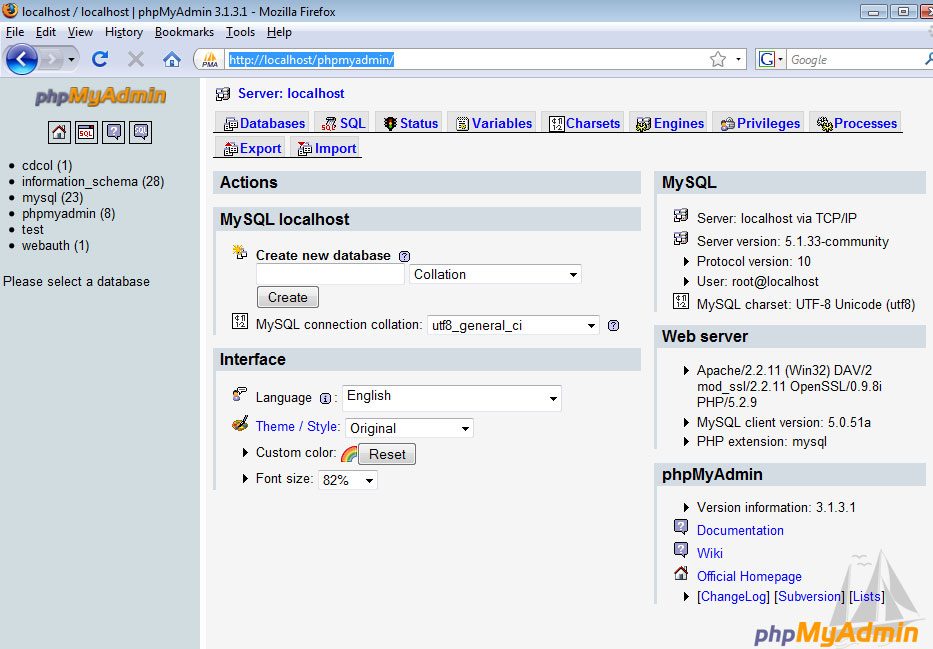
14 Create your WordPress database by entering in a name and pressing the Create button.
In this tutorial, we’ll call it wordpress_db. You’ll need to remember this value for a later step when we configure WordPress.

This is what the following screen will look like:

Creating a WordPress database user
In real-world scenarios, you should never use the default root user because it has all privileges and you don’t want a simple WordPress bug or vulnerability taking down your entire MySQL service.
This isn’t necessary if you’re only testing locally, but we’re going to do this right to promote best practices.
15 Go to phpMyAdmin home by either clicking on the logo on the top left or clicking on the home icon.

16 Click on the Privileges tab.

17 Click on "Add a New User"

18 For the User name field, type in any name, this tutorial uses wordpress_user for simplicity. For Host, select Local.
For Password, type in a value, but it’s highly recommended that you use the Generate Password button to randomly generate a password for better security.
Once you hit the Generate Password button, click on Copy button right beside it to copy it automatically in the Password and Re-type fields.
Important: take a note of the User name and Password you used, we’ll be using it later on.
Here are the settings used:

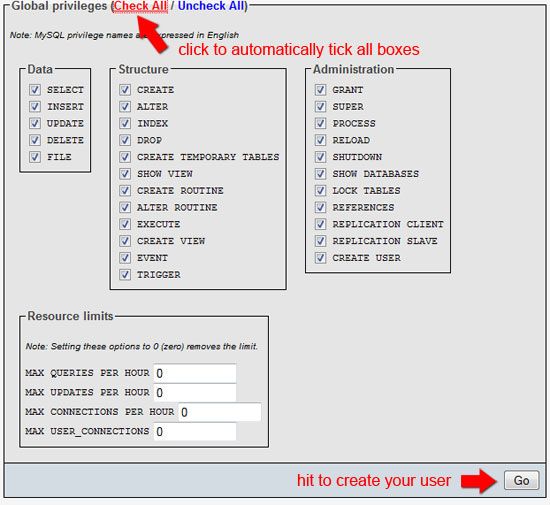
19 Set the Global Privileges of wordpress_user. Typically, you should try to limit the privileges of your database users to a minimum to improve security.
For this example, since it’s a local installation – just check all of them. When you go into production, pare down the privileges!
Hit the Go button to create the database user.
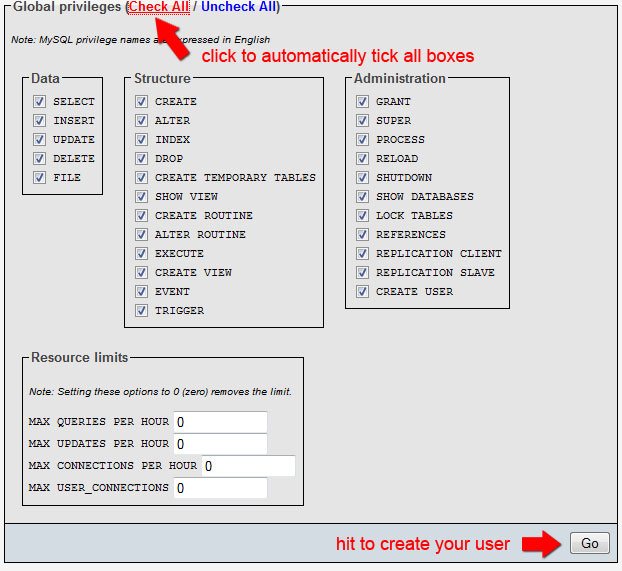
20 If everything went well, you’ll see a confirmation that you’ve created the user successfully.

Adding your newly created user to your database
21 In the next screen, in the Database-specific privileges fieldset, in the Add privileges on the following database field, select wordpress\_db.
This will add wordpress_user as a database user of your wordpress table, wordpress_db.

22 Check that wordpress_user has been added to the database by entering your database.
To enter your database, click on wordpress_db in the left-hand navigation.
23 Click the Privilege tab to see all users that have access to your WordPress database. You should see wordpress_user listed in the Privilege section.

Alright, you’ve just learned how to create a MySQL database user using phpMyAdmin. Give yourself a pat in the back before moving on!
Installing WordPress on your computer
If you’re not familiar with the process of installing WordPress, you should take a look at the following guide on the official WordPress.org site first:
This guide will get you up and running with the general process that we’ll be taking. Please take a moment and read it – I promise, it’ll be quick and painless.
24 Download the latest version of WordPress, save it on your computer.
25 Open your xampp folder. Navigate to the htdocs folder.
If you used the default installation destination, the file path is:
C:\xampp\htdocs
26 Open up the WordPress ZIP file you downloaded. Extract the entire contents in the htdocs folder.

Configuring WordPress: entering your MySQL database information
27 Inside the wordpress folder, open wp-config-sample.php file using your favorite text editor.
Fill in the information with your database information. If you followed along and used the same values as this tutorial, you can use these values:
/** The name of the database for WordPress */
define('DB_NAME', 'wordpress_db');
/** MySQL database username */
define('DB_USER', 'wordpress_user');
/** MySQL database password */
define('DB_PASSWORD', 'typeyourpasswordhere');
/** MySQL hostname */
define('DB_HOST', 'localhost');
28 Once you’re done with the configuration file, save it as wp-config.php in the same folder.
Note: You have to save it as wp-config.php and not wp-config-sample.php.
Running the WordPress install script
29 To finish the installation of WordPress, navigate to the install script. Here’s the file path:
http://localhost/wordpress/wp-admin/install.php
30 If you did everything correctly, you should be greeted by the following screen:
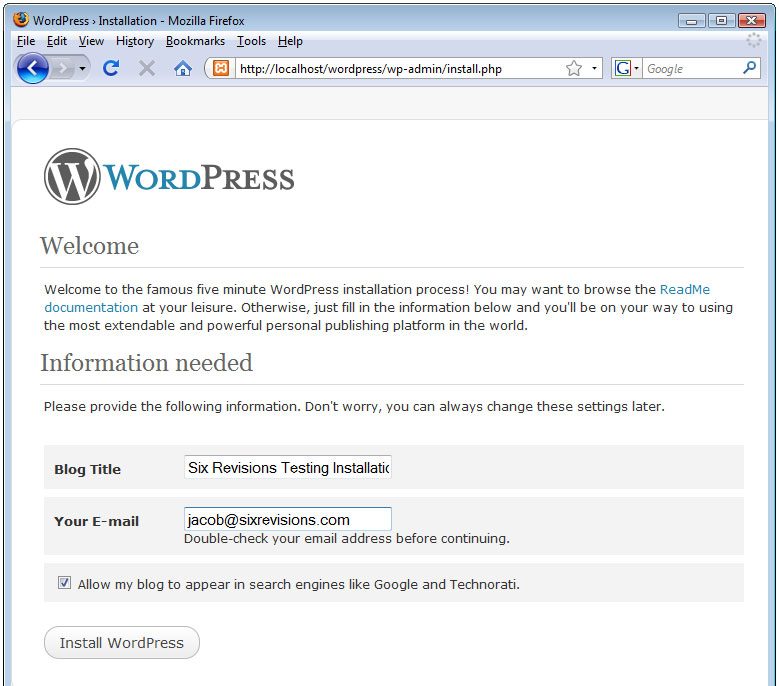
31 Just hit the Install WordPress button, and follow the steps. If this is your first WordPress installation, read the steps of the installation dialog carefully as we won’t be covering it here in detail.
Testing to see if your WordPress installation works
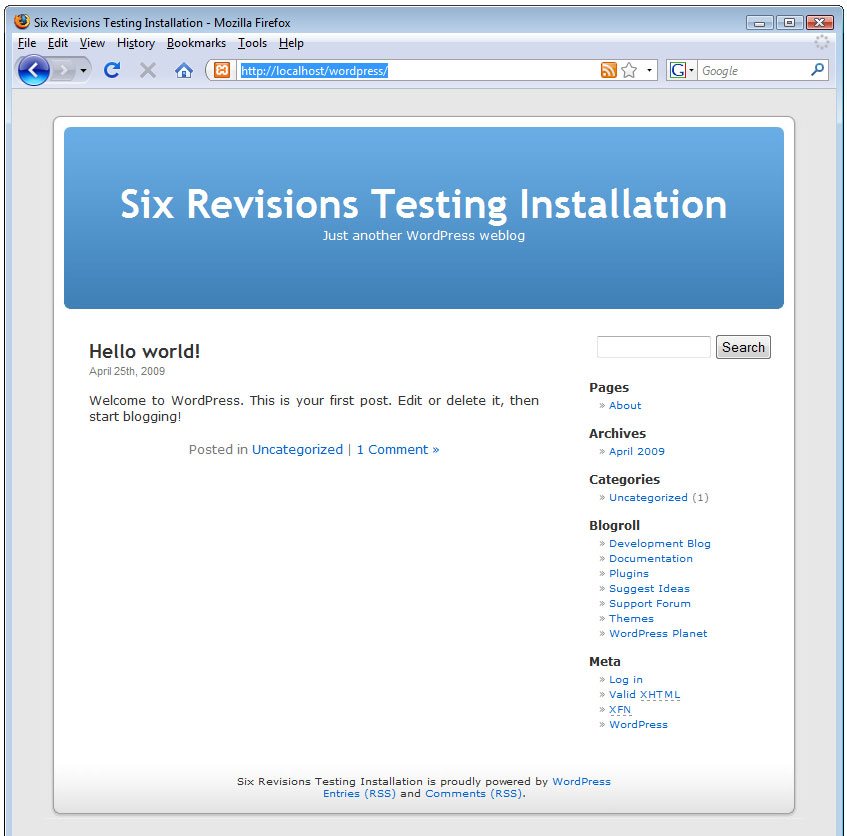
32 Navigate to the home page of your WordPress installation. The file path is:
http://localhost/wordpress/
If everything went well, you should see the default WordPress home page:
Important: take a note of the auto-generated password or else you won’t be able to log into WordPress.
WordPress local installation completed!
Woot, you just installed WordPress on your computer! No more FTP’ing or live web development! You can now test your themes or test site updates before going live.
At this stage, you can log into the WordPress administration section:
http://localhost/wordpress/wp-admin
Alternatively, you can continue in the tutorial (because we’re not done yet).
Next, we’re going to import some test data which you should do when you’re developing WordPress themes to be released to the public.
Importing WordPress test data
33 Download the WordPress XML file from the official WordPress.org site. You can get it through the Theme Development Checklist (which is a great guide by the way), under the Theme Unit Test section.
Here's the direct download link:
http://svn.automattic.com/wpcom-themes/test-data.2008-12-22.xml

34 Log into the WordPress administration section:
http://localhost/wordpress/wp-admin

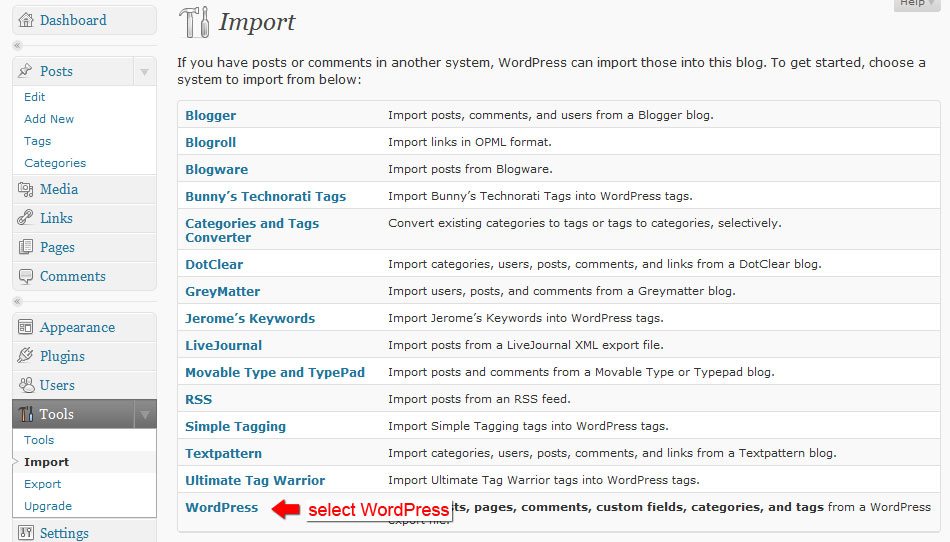
35 In the WordPress admin section, go to Tools > Import (using the sidebar navigation on version 2.7).

36 In the Import page, click on WordPress.
37 Browse to the XML file we downloaded (test-data.xxxx-xx-xx.xml).
Hit the Upload file and Import button.

38 Assign the authors of the post. The XML file created a testing author named Noel Jackson for you.
If you don't want to assign the test posts to Noel Jackson, use the or map to existing field and select the author you want. For this tutorial, assign it to admin.

Click the Submit button.
39 You'll be presented with a log of all the changes made by the import process. Examine it if you want to see exactly what happened.

40 Check to see if the import went according to plan. Easiest way is to go to the home page of your WordPress installation (http://localhost/wordpress).
41 In the home page, you'll see that there's now content for your WordPress installation. This way you can easily check and test your theme for public release.

You're done, you professional PHP/WordPress developer!
Now you can develop WordPress themes and test changes locally on your computer, just like the pro's, not only speeding up your development cycles, but also being able to securely test updates to your existing themes.
Where to go from here
Here are things you should try and do to explore XAMPP:
Try to install a free WordPress theme
Go to the WordPress Themes section for themes you'd like to try out. Alternatively, check out our lists of free WordPress themes: Excellent Free WordPress Themes and Beautiful Free WordPress Themes.
Create a new site
Create a folder under the xampp > htdocs and put some test PHP scripts in it. As you can see, you don't need a web server anymore, you have a fully-featured MySQL and PHP server right there in your computer. Go develop some cool web applications!
Explore additional XAMPP add-ons
There are a good number of XAMPP add-ons for you to extend your local web server. Check them out and install the ones you need. Go to either the Windows, Linux, or Mac OS X download pages to see a list of add-ons you can install.
Summary
In this tutorial, you just learned how easy it is to install XAMPP to the desktop so that you can have your very own PHP web development testing server. More specifically, this is what we did together:
- Installed XAMPP
- Started the Apache and MySQL Services
- Created a MySQL database
- Created a MySQL database user
- Installed and configured WordPress
- Imported some test data
Subscribe to:
Posts (Atom)
