Flash gets a bad rap, undeserved in my opinion, for harming search engine visibility. Why are search engine optimization (SEO) practitioners concerned about Flash, and how can we SEO Flash content? Flash content is often heavy on images and interactive features, and light on text. As of 2008, the leading search engines are heavily dependant on text to understand the meaning of pages.
The leading web development tool, Adobe Dreamweaver, embeds Flash in web pages with code that fails to provide accessibility for visitors or search spiders who cannot handle Flash. Instead of using the default code, my recommendation is to hand code Flash pages with primary HTML content, and a method of automatically testing for Flash support before attempting to insert the movie. The primary HTML content can be search optimized as if the Flash wasn't there, while the Flash provides an enhanced user experience for those visitors who have the necessary Flash player.
The April 11, 2006 release of Microsoft's popular Internet Explorer (IE) browser includes an update ("Eolas") that prevents ActiveX-based Flash controls from working properly. When the user attempts to interact with the Flash, a tool tip appears, stating, "Click to activate and use this control." That extra click is an annoyance. In addition to helping search engines, the programming techniques described in this article solve the Flash Eolas problem.
Flash animation is a great way to present complex content because it allows the designer to put more content in a finite space, without wrecking page design. For technology sites, Flash is an ideal way to present a slide show or movie explaining a complex product. At the other end of the spectrum, art and entertainment sites have a real need for multimedia, and Flash is the perfect solution.
When using Flash, we'd like to satisfy each of these objectives:
Clean design
Search Engine Optimization
Accessibility for a wide variety of browsers, including screen readers and mobile phones
Code validation and standards compliance
Correct functionality with IE
SEO Flash Programming
My recommended Flash SEO method uses a DIV with search-engine-accessible, primary content, and an open source Javascript function called swfobject() to detect when browsers are capable of viewing Flash. When an appropriate version of Flash player is present, the Javascript manipulates the page's document object model (DOM) to replace the primary content with the Flash movie. Most search engine spiders can't handle Flash, so they will elect to view the primary content. The primary content may contain links, headings, styled text, images—anything we can add to an ordinary HTML page. With SEO copyediting and coding skills applied to the primary content, Flash becomes a non-issue.
As of July 2007, I discussed this method with Dan Crow of Google. He warned that this programming method could draw attention because of the possibility for abuse. If you use this method, make sure the alternative content is a faithful representation of the Flash content, and avoid combining this with other coding methods that could be abused. While this SEO method is not abusive, it is aggressive because there is a small risk that the search engines could mistakenly decide that the primary content is a form of cloaking.
SWFObject 2.0
SWFObject 2.0 is an open source project based on Geoff Sterns' original SWFobject() and UFO (Unobtrusive Flash Objects) by Bobby van der Sluis. As reported at swfobject, Adobe is likely to include swfobject() in future releases of its web development tools.
Scalable Inman Flash Replacement
If you are only using Flash to enhance headings, quotes, or callout text, a method called Scalable Inman Flash Replacement is an excellent choice. SIFR automatically pulls text from an HTML document and modifies the Document Object Model to replace the text with a Flash rendering of the appropriate font. SIFR makes it easy to modify the text, and ensures that your Flash text always matches your HTML text, reducing the risk of abuse.
The drawback of SIFR is that it only handles the presentation of simple text. Complex Flash animations, such as menus, slide shows, and interactive presentations can not be programmed easily with SIFR. For these types of Flash, SWFOBJECT and UFO are more effective.
Example: Making Flash Home Page Spiderable
The sample code below is derived from the home page of TrueVector Technologies which includes two Flash objects. The content of that page can now be indexed because search engines can read the HTML-coded content, while visitors with Javascript and Flash can view enhanced visual content.
<head> <!--snip--> <script type="text/javascript" src="/js/swfobject.js"> </script> <script type="text/javascript"> var flashvars = {}; var params = { wmode: "transparent" }; var attributes = {};
var flashvars2 = {}; var params2 = { wmode: "transparent" }; var attributes2 = {};
1) a tool designed to enhance web site navigation.
2) by eliminating clumsy dropdown boxes and checklists.
3) giving users easier access to data or inventory.
4) leading to an enjoyable surfing experience.
5) resulting in higher click-through rates and longer site visits.
6) which lead to more return visits and site referrals.
7) ultimately ending in true Vector's customers suffering <strong>higher profits</strong>.</p> <p><strong>Syn:</strong>Interactive Map/ Flash Map/ Zip Code Map/Rate Center Map/ Store Locator Map/ Real Estate Map/TrueVector Flash Map/ US Interactive Map</p></div>
Flash accessibility programming will not magically cause a site to rise to the top of the rankings, but this Flash SEO method will eliminate any ranking disadvantages associated with Flash.
We've used this Flash SEO method on many high traffic sites. The code has been served hundreds of thousands of times. Sites using this Flash SEO method have achieved top rankings for keywords found only in the Flash content.
All Flash Sites
A site built entirely with Flash suffers a great disadvantage because it lacks page structure to organize the content, internal linking, and unique page titles. One remedy is to create distinct HTML pages to represent each Flash "page," and install the Flash movie on each and every one of the HTML pages. When a visitor requests the page, they'll see Flash if they can handle it. Otherwise, a non-Flash visitor, such as a search engine, will be able to spider the site. If a user follows a search result onto one of the inner pages, they'll get the same Flash experience because the movie is available on every page. Another approach is to divide the Flash into pieces and put the relevant piece on each page.
Slicing up the Flash can result in page transitions that don't provide the seamless effect that you want to create. To get the best of both worlds, pass a parameter into the Flash movie using FlashVars. The same movie can appear on each HTML page, but depending on the parameter value, the movie can start at an appropriate point to show the Flash content that corresponds to that page. To get rid of all the extra pages, but still be able to reference different parts of the Flash piece, add a # and a tag to the end of each URL, and pass that tag into the Flash. This approach can make the back and forward buttons work properly, and allow people to bookmark specific parts of the Flash site.
It is also possible to use PHP scripts to pull both the primary HTML content, and the Flash content from a MySQL database. This approach would greatly simplify the maintenance of an accessible Flash site by storing only one representation of the content.
Search is a natural starting point for discovering the world's information, and we strive to bring you the freshest, most comprehensive and relevant search results over an ever expanding universe of content on the multitude of devices you use to access it.
That's why today, at the Computer History Museum, we're excited to share a few new innovations in the areas of real-time, mobile and social search that we feel are important steps in the evolution of information access.
First, we're introducing new features that bring your search results to life with a dynamic stream of real-time content from across the web. Now, immediately after conducting a search, you can see live updates from people on popular sites like Twitter and FriendFeed, as well as headlines from news and blog posts published just seconds before. When they are relevant, we'll rank these latest results to show the freshest information right on the search results page.
Try searching for your favorite TV show, sporting event or the latest development on a recent government bill. Whether it's an eyewitness tweet, a breaking news story or a fresh blog post, you can find it on Google right after it's published on the web.
Here's how it looks:
Our real-time search enables you to discover breaking news the moment it's happening, even if it's not the popular news of the day, and even if you didn't know about it beforehand. For example, in the screen shot, the big story was about GM's stabilizing car sales, which shows under "News results." Nonetheless, thanks to our powerful real-time algorithms, the "Latest results" feature surfaces another important story breaking just seconds before: GM's CEO stepped down.
Click on "Latest results" or select "Latest" from the search options menu to view a full page of live tweets, blogs, news and other web content scrolling right on Google. You can also filter your results to see only "Updates" from micro-blogs like Twitter, FriendFeed, Jaiku and others. Latest results and the new search options are also designed for iPhone and Android devices when you need them on the go, be it a quick glance at changing information like ski conditions or opening night chatter about a new movie — right when you're in line to buy tickets.
And, as part of our launch of real-time on Google search, we've added "hot topics" to Google Trends to show the most common topics people are publishing to the web in real-time. With this improvement and a series of other interface enhancements, Google Trends is graduating from Labs.
Our real-time search features are based on more than a dozen new search technologies that enable us to monitor more than a billion documents and process hundreds of millions of real-time changes each day. Of course, none of this would be possible without the support of our new partners that we're announcing today: Facebook, MySpace, FriendFeed, Jaiku and Identi.ca — along with Twitter, which we announced a few weeks ago.
The new features will be rolling out in the next few days and will be available globally in English. You can try them out today by visiting Google Trends and clicking on a "hot topic," which in most cases will bring you to a search results page with the new real-time feature.
Here's a first look at our real-time search:
We have also made some new strides with mobile search. Today's sensor-rich smartphones are redefining what "query" means. Beyond text, you can now search by a number of new modes including voice, location and sight — all from a mobile device. So we've been working to improve technology that takes advantage of these capabilities.
Starting today, we're extending our voice search capabilities on Android devices to recognize Japanese. In addition, we're using the location of your mobile phone to launch some helpful features, like showing you "what's nearby." Finally, at our event this morning, we demonstrated Google Goggles, a visual search application that lets you search for objects using images rather than words, using your camera phone. For more information on these mobile innovations, check out the Google Mobile Blog.
As we've written before, search is still an unsolved problem and we're committed to making it faster and easier for people to access a greater diversity of information, delivered in real-time, from across the web. I'm tremendously excited about these significant new real-time search features.
Update on 12/8: Check out the video from our Search Event:
How to Install wordpress in Local System with XAMPP
In this tutorial, you’ll learn how to install and configure XAMPP for the desktop. Once that’s out of the way, we’ll install WordPress so that you can have your very own professional, light-weight PHP and WordPress development environment.
Introduction
To sum it up in one sentence: XAMPP, which stands for Cross-Platform (X) Apache, MySQL, PHP and Perl, is a popular, free and open source web server package that you can use to install a web server onto your desktop.
XAMPP allows you to develop PHP and Perl-based server-side scripting applications without the need for a remote web server, offering you the opportunity to work faster, develop stuff more securely, and work on your apps without an internet connection.
In this tutorial – you’ll see exactly how XAMPP can do splendid things to your development cycles.
We’re going to use a simple xampple (sorry, I had to get that out of the way, been thinking about saying that for a long time): we’re going to install XAMPP and WordPress with some test data to have WordPress right on our desktop.
This tutorial is for Windows Vista, so you’ll have to tweak the steps involved depending on your operating system. Here’s what you’ll be doing in this tutorial:
Objectives
Downloading and Installing XAMPP
Starting up your Apache and MySQL services
Installing and configuring WordPress locally
Creating a MySQL database for WordPress
Creating a MySQL database user for WordPress in phpMyAdmin
Importing some test data for WordPress using an XML file
This tutorial covers installing XAMPP in Windows Vista, so you’ll have to tweak the steps a little bit if you’re using a different operating system.
2 Choose the package you want: for normal web development, just go with the Basic Package.
The Basic Package comes with a host of useful applications, libraries, and extensions such as phpMyAdmin (which we’ll use to set up WordPress later on) and eAccelerator (a popular PHP caching application to optimize and improve PHP script performance). For this tutorial, choose the Installer version.
Download it (Save File) onto your computer.
3 Open up the executable (for Windows users, it’s called xampp-win32-1.7.1-installer.exe).
The following figure shows the first dialog box; it asks you to select which language you want to use.
The next dialog you’ll see is the first page of the XAMPP Setup Wizard.
4 Pick a destination for the installation.
Note: XAMPP suggests not to install it in the Program Files folder (i.e. C:\Program Files\xampp), so just install it in the root of your drive (C:\xampp)
5 Configure your options in the XAMPP Options dialog box. For this tutorial, just go with the default installation options.
That’s it for the installation, quick and painless wasn’t it? Let’s fire up Apache and MySQL.
Starting up your Apache and MySQL services
6 After the installation, you should’ve been presented with an option that asks you to open the XAMPP Control Panel. If you didn’t get that option, do one of the following:
Option 1: Navigate to it using the Windows interface
Start > All Programs > Apache Friends > XAMPP > XAMPP Control Panel
Option 2: Open the XAMPP Control Panel directly
If you didn’t select the "Create Shortcut" option in the installation, then navigate to the XAMPP installation folder and open the file called xampp-control.exe.
7 The XAMPP Control Panel should look like the following figure:
8 Click the Start button beside Apache. If you’re on Windows, you’ll get a Windows Firewall warning: choose Unblock.
9 If all goes well, you should see the XAMPP Control Panel log updated with "Apache Started", and "Running" with a green background right beside the Apache service.
10 Start the MySQL service using the same method as step 8.
Testing to see if it works
11 With your Apache and MySQL services started, open up a web browser and navigate to localhost using the following path:
http://localhost
12 You should see the following screen:
Congratulations, you now have your very own locally hosted (localhost) web server!
Depending on your operating system, you’re now the proud owner of a WAMP (Windows users), MAMP (Mac OS X users) or LAMP (badass Linux users) server right there inside your computer.
Now let’s move onto installing WordPress on your machine. First, we’re going to set up your WordPress MySQL database and create a MySQL database user for it. That’s the topic for the next section.
Setting up your MySQL database for WordPress
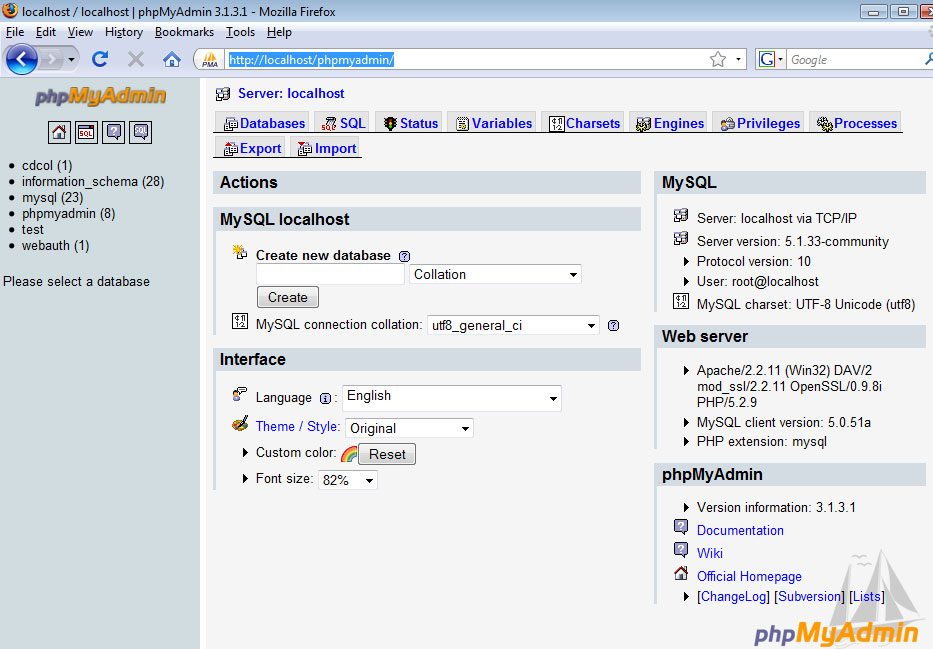
The easiest way to create a MySQL database using XAMPP would be to use phpMyAdmin, which comes with the Basic Package that we installed.
13 Navigate to phpMyAdmin through your web browser. The URL is:
http://localhost/phpmyadmin/
14 Create your WordPress database by entering in a name and pressing the Create button.
In this tutorial, we’ll call it wordpress_db. You’ll need to remember this value for a later step when we configure WordPress.
This is what the following screen will look like:
Creating a WordPress database user
In real-world scenarios, you should never use the default root user because it has all privileges and you don’t want a simple WordPress bug or vulnerability taking down your entire MySQL service.
This isn’t necessary if you’re only testing locally, but we’re going to do this right to promote best practices.
15 Go to phpMyAdmin home by either clicking on the logo on the top left or clicking on the home icon.
16 Click on the Privileges tab.
17 Click on "Add a New User"
18 For the User name field, type in any name, this tutorial uses wordpress_user for simplicity. For Host, select Local.
For Password, type in a value, but it’s highly recommended that you use the Generate Password button to randomly generate a password for better security.
Once you hit the Generate Password button, click on Copy button right beside it to copy it automatically in the Password and Re-type fields.
Important: take a note of the User name and Password you used, we’ll be using it later on.
Here are the settings used:
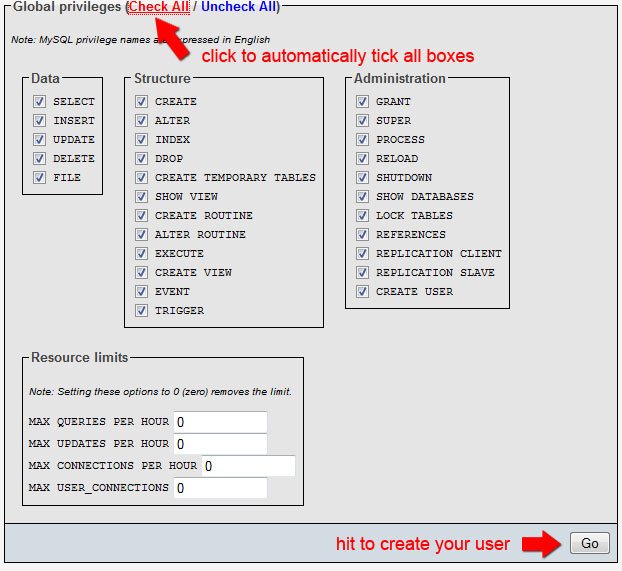
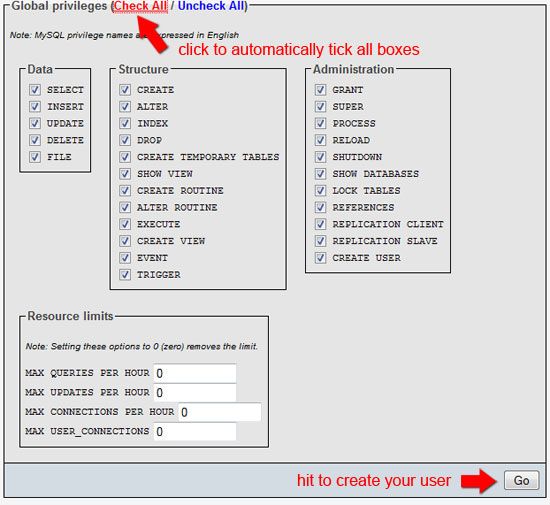
19 Set the Global Privileges of wordpress_user. Typically, you should try to limit the privileges of your database users to a minimum to improve security.
For this example, since it’s a local installation – just check all of them. When you go into production, pare down the privileges!
Hit the Go button to create the database user.
20 If everything went well, you’ll see a confirmation that you’ve created the user successfully.
Adding your newly created user to your database
21 In the next screen, in the Database-specific privileges fieldset, in the Add privileges on the following database field, select wordpress\_db.
This will add wordpress_user as a database user of your wordpress table, wordpress_db.
22 Check that wordpress_user has been added to the database by entering your database.
To enter your database, click on wordpress_db in the left-hand navigation.
23 Click the Privilege tab to see all users that have access to your WordPress database. You should see wordpress_user listed in the Privilege section.
Alright, you’ve just learned how to create a MySQL database user using phpMyAdmin. Give yourself a pat in the back before moving on!
Installing WordPress on your computer
If you’re not familiar with the process of installing WordPress, you should take a look at the following guide on the official WordPress.org site first:
This guide will get you up and running with the general process that we’ll be taking. Please take a moment and read it – I promise, it’ll be quick and painless.
25 Open your xampp folder. Navigate to the htdocs folder.
If you used the default installation destination, the file path is:
C:\xampp\htdocs
26 Open up the WordPress ZIP file you downloaded. Extract the entire contents in the htdocs folder.
Configuring WordPress: entering your MySQL database information
27 Inside the wordpress folder, open wp-config-sample.php file using your favorite text editor.
Fill in the information with your database information. If you followed along and used the same values as this tutorial, you can use these values:
/** The name of the database for WordPress */
define('DB_NAME', 'wordpress_db');
/** MySQL database username */
define('DB_USER', 'wordpress_user');
/** MySQL database password */
define('DB_PASSWORD', 'typeyourpasswordhere');
/** MySQL hostname */
define('DB_HOST', 'localhost');
28 Once you’re done with the configuration file, save it as wp-config.php in the same folder.
Note: You have to save it as wp-config.php and not wp-config-sample.php.
Running the WordPress install script
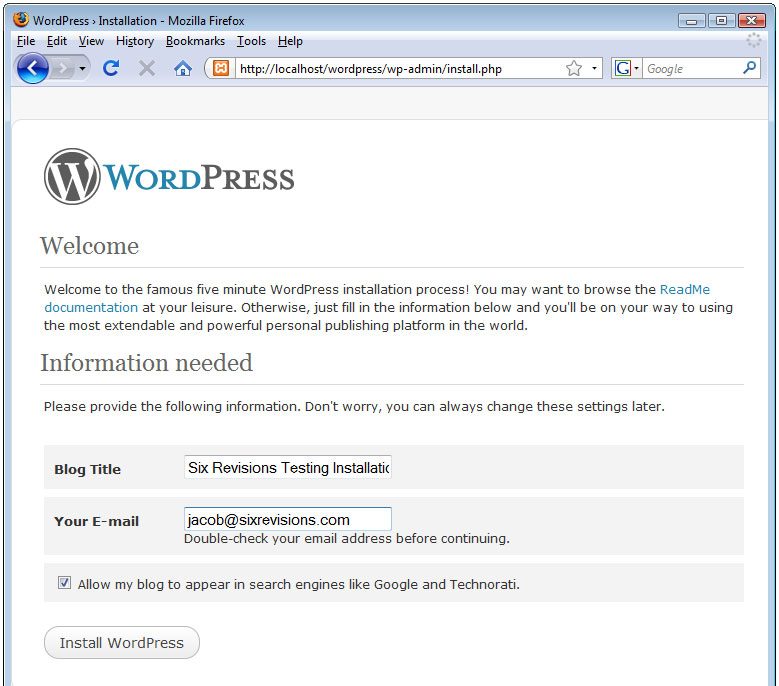
29 To finish the installation of WordPress, navigate to the install script. Here’s the file path:
http://localhost/wordpress/wp-admin/install.php
30 If you did everything correctly, you should be greeted by the following screen:
31 Just hit the Install WordPress button, and follow the steps. If this is your first WordPress installation, read the steps of the installation dialog carefully as we won’t be covering it here in detail.
Testing to see if your WordPress installation works
32 Navigate to the home page of your WordPress installation. The file path is:
http://localhost/wordpress/
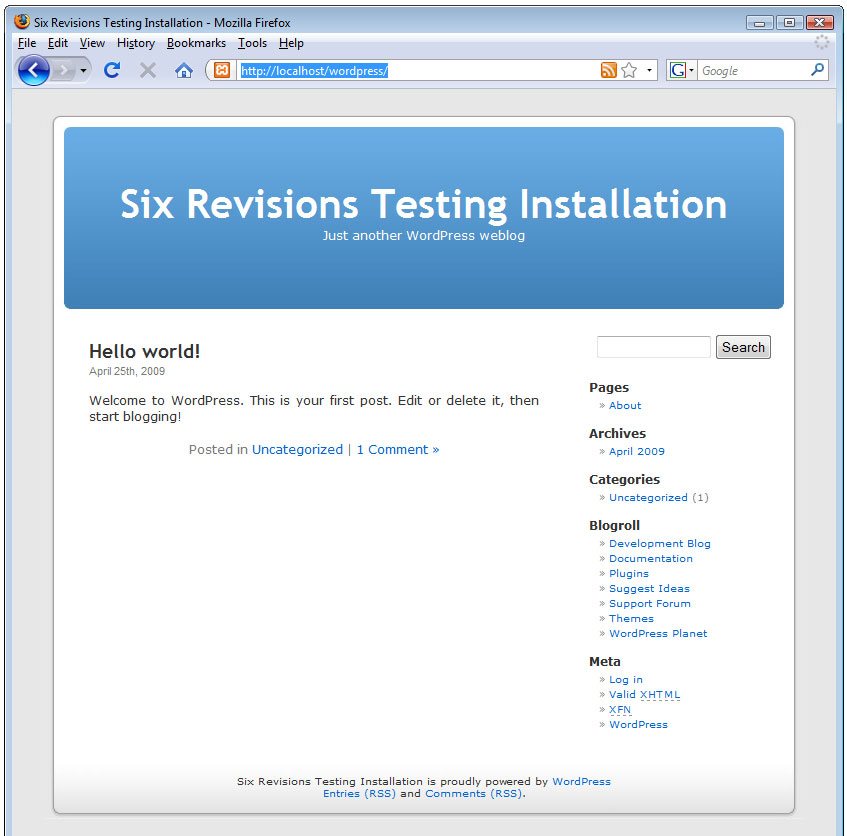
If everything went well, you should see the default WordPress home page:
Important: take a note of the auto-generated password or else you won’t be able to log into WordPress.
WordPress local installation completed!
Woot, you just installed WordPress on your computer! No more FTP’ing or live web development! You can now test your themes or test site updates before going live.
At this stage, you can log into the WordPress administration section:
http://localhost/wordpress/wp-admin
Alternatively, you can continue in the tutorial (because we’re not done yet).
Next, we’re going to import some test data which you should do when you’re developing WordPress themes to be released to the public.
Importing WordPress test data
33 Download the WordPress XML file from the official WordPress.org site. You can get it through the Theme Development Checklist (which is a great guide by the way), under the Theme Unit Test section.
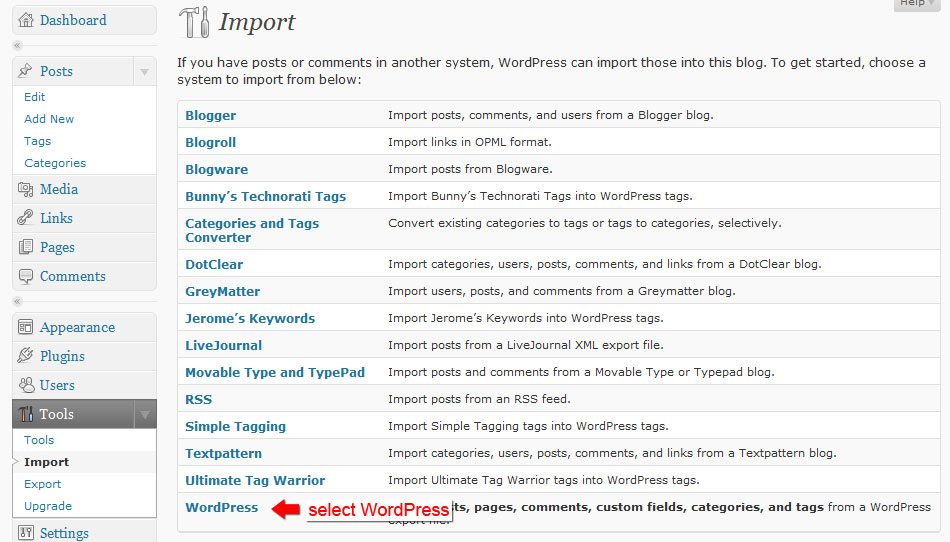
35 In the WordPress admin section, go to Tools > Import (using the sidebar navigation on version 2.7).
36 In the Import page, click on WordPress.
37 Browse to the XML file we downloaded (test-data.xxxx-xx-xx.xml).
Hit the Upload file and Import button.
38 Assign the authors of the post. The XML file created a testing author named Noel Jackson for you.
If you don't want to assign the test posts to Noel Jackson, use the or map to existing field and select the author you want. For this tutorial, assign it to admin.
Click the Submit button.
39 You'll be presented with a log of all the changes made by the import process. Examine it if you want to see exactly what happened.
40 Check to see if the import went according to plan. Easiest way is to go to the home page of your WordPress installation (http://localhost/wordpress).
41 In the home page, you'll see that there's now content for your WordPress installation. This way you can easily check and test your theme for public release.
You're done, you professional PHP/WordPress developer!
Now you can develop WordPress themes and test changes locally on your computer, just like the pro's, not only speeding up your development cycles, but also being able to securely test updates to your existing themes.
Where to go from here
Here are things you should try and do to explore XAMPP:
Create a folder under the xampp > htdocs and put some test PHP scripts in it. As you can see, you don't need a web server anymore, you have a fully-featured MySQL and PHP server right there in your computer. Go develop some cool web applications!
Explore additional XAMPP add-ons
There are a good number of XAMPP add-ons for you to extend your local web server. Check them out and install the ones you need. Go to either the Windows, Linux, or Mac OS X download pages to see a list of add-ons you can install.
Summary
In this tutorial, you just learned how easy it is to install XAMPP to the desktop so that you can have your very own PHP web development testing server. More specifically, this is what we did together:
Posted by
Pradeep
|
Posted in
SEO BOOK
|
Posted on
4:44 AM
SEO
Search Engine Optimization (SEO) is often considered the more technical part of Web marketing. This is true because SEO does help in the promotion of sites and at the same time it requires some technical knowledge – at least familiarity with basic HTML. SEO is sometimes also called SEO copyrighting because most of the techniques that are used to promote sites in search engines deal with text. Generally, SEO can be defined as the activity of optimizing Web pages or whole sites in order to make them more search engine-friendly, thus getting higher positions in search results.
How Search Engines Work
The first basic truth you need to learn about SEO is that search engines are not humans. While this might be obvious for everybody, the differences between how humans and search engines view web pages aren't. Unlike humans, search engines are text-driven. Although technology advances rapidly, search engines are far from intelligent creatures that can feel the beauty of a cool design or enjoy the sounds and movement in movies. Instead, search engines crawl the Web, looking at particular site items (mainly text) to get an idea what a site is about. This brief explanation is not the most precise because as we will see next, search engines perform several activities in order to deliver search results – crawling, indexing, processing, calculating relevancy, and retrieving.
First, search engines crawl the Web to see what is there. This task is performed by e piece of software, called a crawler or a spider (or Googlebot, as is the case with Google). Spiders follow links from one page to another and index everything they find on their way. Having in mind the number of pages on the Web (over 20 billion), it is impossible for a spider to visit a site daily just to see if a new page has appeared or if an existing page has been modified. Sometimes crawlers will not visit your site for a month or two, so during this time your SEO efforts will not be rewarded. But there is nothing you can do about it, so just keep quiet.
SEO PROCESS:
Site Analysis.
Competitor Analysis.
Keyword research/Analysis/Page wise grouping.
SEO startegy
On page optimization.
Off page optimization.
SITE ANALYSIS:
Normally, it defines the current performance of website in several search engines.
Meta Tag Analysis.
Search Engine Indexing Analysis.
Back link analysis
Search engine friendly analysis.
Architecture & Navigation.
META TAG ANALYSIS:
They are information inserted into the "head" area of your web pages. Other than the title tag (explained below), information in the head area of your web pages is not seen by those viewing your pages in browsers. Instead, meta information in this area is used to communicate information that a human visitor may not be concerned with.
The Title Tag
The HTML title tag isn't really a meta tag, but it's worth discussing in relation to them. Whatever text you place in the title tag (between the
and portions as shown in the example) will appear in the reverse bar of someone's browser when they view the web page
The text you use in the title tag is one of the most important factors in how a search engine may decide to rank your web page. In addition, all major crawlers will use the text of your title tag as the text they use for the title of your page in your listings.
The Meta Description Tag
The meta description tag allows you to influence the description of your page in the crawlers that support the tag (these are listed on the Search Engine Features page).
The Meta Keywords Tag
The meta keywords tag allows you to provide additional text for crawler-based search engines to index along with your body copy.
The meta keywords tag is sometimes useful as a way to reinforce the terms you think a page is important for ON THE FEW CRAWLERS THAT SUPPORT IT.
2.SEARCH ENGINE INDEXING ANALYSIS:
In search engine analysis, it defines the number of pages of website indexed in various search engines. And also to check LAST CRAWLED DATE for particular website in several search engines.
3. BACK LINK ANALYSIS:
Building Quality backlinks is one of the most important factors in Search Engine Optimization.
It is not enough just to have a lot of backlinks, it is the Quality of backlinks along with the Quantity that help you rank better in Search Engines.
A backlink could be considered as a Quality Backlink if
1. The Theme of the backlinking website is the same as your website.
2. It links to your website with the keyword (keyphrase) that you are trying to optimize for.
3.SEARCH ENGINE FRIENDLY ANALYSIS:
search engines have no means to index directly extras like images, sounds, flash movies, javascript. Instead, they rely on your to provide meaningful textual description and based on it they can index these files. If technology advances further, one day it might be possible for search engines to index images, movies, etc. but for the time being this is just a dream.
Search engine does not consider much about :
1.Frames
2.Flash
3.Dynamic Url’s
4.Java scripts(internal).
5.CSS
4.ARCHITECTURE AND NAVIGATION:
In this section, we should analysis the things that includes
1.Inter Page Linking.
2.Site Map.
3.Rss-Feed.
COMPETITOR ANALYSIS:
We should also do Competitor Analysis, Because we will get more ideas by doing so,we can get what all backlinks they have got and where all they have got and also what kind of keywords they are targeting, like that we will get some effective strategy by analyzing competitor.
Factors:
·Meta Tag Analysis.
·Search engine indexing analysis
·Link popularity and page rank.
·Back Link Analysis.
KEYWORD RESEARCH:
Keywords are the most important SEO item for every search engine – actually they are what search strings are matched against. So you see that it is very important that you optimize your site for the right keywords.
1. KEY WORD DENSITY:
Keyword density is a common measure of how relevant a page is. Generally, the idea is that the higher the keyword density, the more relevant to the search string a page is. The recommended density is 3-7% for the major 2 or 3 keywords and 1-2% for minor keywords.
2.KEYWORD PROXIMITY:
Keyword Proximity refers to the distance between two words or phrases, or how close keywords are to each other within a body of text. The closer the two keywords are to each other, the higher the weight for that phrase.
3.KEYWORD PROMINANCE:
The location (i.e. placement) of a given keyword in the HTML source code of a web page. The higher up in the page a particular word is, the more prominent it is and thus the more weight that word is assigned by the search engine when that word matches a keyword search done by a search engine user. Consequently, it's best to have your first paragraph be chock full of important keywords rather than superfluous marketingspeak. This concept also applies to the location of important keywords within individual HTML tags, such as heading tags, title tags, or hyperlink text.
There are 3 ways to do keyword research.
1.Generic keyword.
We always try to avoid using such generic keywords, because generic keywords always have high competition, So it will take much time to be optimized for certain keywords.
2.Long tail Keywords:
Focusing on long tail keywords can be one of the best ways to compete in a niche that is competitive, and can provide almost immediate traffic to a brand new website or web page.
3.CONVERSION KEYWORDS/POPULER KEYWORD:
The keyword which has high search count with low competition are called as popular keywords.
ON PAGE OPTIMIZATION:
On page optimization is one of the very first step of SEO which every webmaster should look into. It probably won’t even take you an hour to learn and implement some of these on-page optimization techniques.
1.Meta Tag Optimization:
A site’s Meta description should contain a brief description of your website focusing on the areas and services that your business is specialized in. This small piece of text can be considered as a selling snippet, if a searcher finds it appealing he is likely to click and go inside your page to find out more information. But if your Meta Description is too generic and isn’t written too well then there is a good chance that your site will simply be ignored.
2. Code Optimization/Content Optimization:
Always content should be very clear. It should be in user point of view, not in search engine point of view. We should of course concentrate on our user and easy readability, but we always have to have an eye on the search engines as well. For our users its clear what a certain page is about if its written in the headline, but for search engines its better to repeat the important keywords several times. So you have to strike the right balance:
2.Image Optimization:
If our site has lot of images, we need to optimize them too as they can’t be read by the search engines. It’s very easy for a human reader to interpret the image into its meaning. However for a Web crawler the whole interpreting process is completely different. Search Engine spiders can only read text but not images. So we need to use some special tags for your images in order to give them some meaning.
Alt text: ALT text or Alternate Text is the text to describe your image when your mouse moves over an image on your web page. The text should be meaningful but short. You can use your relevant keywords as ALT text. If your browser can’t display the image for some reason, the alt text is used in place of that particular image.
Image Title: always use the title tag in images which will show the title as tool tip when a user moves his mouse over the image. Example of an image with title tag: [img src=”http://imagelocation.jpg” alt=”Image description” title=”Title of the Image”]
Image Linking: Whenever you want to link to your image, use the image keywords in your link text. Example: use “view an Apple iPhone”, instead of “Click here to view” as the anchor text.
OFF PAGE OPTIMIZATION:
In search engine optimization, off-page optimization refers to factors that have an effect on your Web site or Web page listing in natural search results. These factors are off-site in that they are not controlled by you or the coding on your page. Examples of off-page optimization include things such as link popularity and page rank.
Generally, in off page optimization there are different factors we should consider:
1.Directories
2.Articles
3.Rss-feed promotion.
4.Blogs
For getting quality backlinks, we should link our website to some directories, articles, blogs etc, Because by posting our links to different places, we can get some reasonable quality links,But we should always remember that it should be in study level. Because if we have more backlinks at once, then it will be a problem, So its always better have a reasonable number of backlinks.
GOOGLE GUIDELINES:
Quality guidelines:
·Avoid hidden text or hidden links.
·Don't use cloaking or sneaky redirects.
·Don't send automated queries to Google.
·Don't load pages with irrelevant keywords.
·Don't create multiple pages, subdomains, or domains with substantially duplicate content.
·Don't create pages with malicious behavior, such as phishing or installing viruses, trojans, or other badware.
·Avoid "doorway" pages created just for search engines, or other "cookie cutter" approaches such as affiliate programs with little or no original content.
Cloaking
Cloaking refers to the practice of presenting different content or URLs to users and search engines. Serving up different results based on user agent may cause your site to be perceived as deceptive and removed from the Google index.
Doorway pages
Doorway pages are typically large sets of poor-quality pages where each page is optimized for a specific keyword or phrase. In many cases, doorway pages are written to rank for a particular phrase and then funnel users to a single destination.
PAGE RANK:
Page Rank is a link analysis algorithm that assigns a numerical weighting to each element of a hyperlinked set of documents, such as the World Wide Web, with the purpose of "measuring" its relative importance within the set. The algorithm may be applied to any collection of entities with reciprocal quotations and references. The numerical weight that it assigns to any given element E is also called the PageRank of E and denoted by PR(E).
OFF PAGE OPTIMIZATION:
In search engine optimization, off-page optimization refers to factors that have an effect on your Web site or Web page listing in natural search results. These factors are off-site in that they are not controlled by you or the coding on your page. Examples of off-page optimization include things such as link popularity and page rank.
Generally, in off page optimization there are different factors we should consider:
5.Directories
6.Articles
7.Rss-feed promotion.
8.Blogs
Link Popularity:
1.One way Link
2.Two Way Link
3.Three Way Link
4.Paid Links
5.Affiliate Links
1.ONE WAY LINK:
To rank online, you have to have one way links pointing back to your site. You can no longer survive with on page optimization. You have to strongly look at and perform off page optimization. You need to get backlinks to your site in the form of one way links. One way links will help your website to rank higher in the search engines. In turn, you will get more targeted traffic.
it is much easier to get one way links to your site. You can use the power of social networks to generate one way links to your site. Some social networks include sites like digg.com, myspace.com, youtube.com, squidoo.com, hubpages.com, and stumbleupon.com.
An example of a one-way link is when either SiteA links to SiteB OR SiteB links to SiteA, it is one-way only.
SiteA<-----SiteB
OR
SiteA----->SiteB
2.TWO WAY LINK (OR) RECIPROCAL LINK:
This method refers to the simple exchange of links between websites. A site agrees to place a link on one of its pages in exchange for a link from your site, and the links could either be text or a banner/graphic.
Reciprocal linking can be done through different methods. One method is to submit your Web site to directories, this is where you pick a top level category and include your Web site and description in there. A popular directory can provide you with targeted traffic, and these directories often come in three forms, which are the free non-reciprocal, free reciprocal or the paid directory.
In a Free non reciprocal directory, you can submit it for free without needing to link back to them. For Free reciprocal directories, you can submit your link for free, but you will have to have a link from your site to the directory in order to get accepted. Lastly, in a Paid directory, you have to pay either per month/year or lifetime, in order to get your site listed.
An example of a reciprocal link is when SiteA links to SiteB AND SiteB links to SiteA, the link is reciprocated by both parties.
SiteA-----> SiteB
AND
SiteA<----- SiteB
3.THREE WAY LINK:
Some webmasters own multiple sites and try to build up one of their specific sites by offering link exchanges from their other sites. In doing this they add a link to you on their other site and get you to link to the main site they are trying to build up.
4.PAID LINKS:
Buying or selling link is called as paid link.
DIRECTORY SUBMISSION:
By submitting our link to quality directories, we can get effective page ranking in search engines.
1.General directories.
2.Theme Based Directories.
3.Local Directories.
Theme Based Directories.
Theme-based directories offer the ability to really provide more detailed, industry-specific information.
General Directories.:
Directories which cove a broad range of topics which is called General Directories
Local Directories:
Directories which is used by particular set of peoples or location oriented is called Loacl directories.
Blogs:
A blogis a Web site, usually maintained by an individual with regular entries of commentary, descriptions of events, or other material such as graphics or video. Entries are commonly displayed in reverse-chronological order. "Blog" can also be used as a verb, meaning to maintain or add content to a blog.
Articles:
SEO Articles is the place to come for free information about search engine optimization and the Internet marketing industry, "Designing a Web site so that search engines easily find the pages and index them. The goal is to have your page be in the top 10 results of a search. Optimization includes the choice of words used in the text paragraphs and the placement of those words on the page…"
Social Bookmaking:
SEO QUIZ:
1. What are the advantages of submitting sites to search directories? Check all that apply.
a.
Submitting to search directories increases your rating with search engines.
b.
By submitting to a search directory, you get a backlink to your site.
c.
By submitting to a search directory your site gets certified.
d.
When your site is listed in search directories, this increases the chances that search engines will index it sooner, compared to when it is not listed.
e.
Submitting to search directories is a good Web marketing initiative.
Explanation: Correct are b., d. and e. because submitting a site to search engines is a good Web marketing initiative that increases the chances of having your site index and when your site is listed in a search directory, you list its URL as well, so you actually get a valuable link. a. and c. are wrong because the sole fact of submitting your site to search directories neither gets you a higher ranking, nor gets your site certified.
2 .You are a SEO expert and a potential customer of yours asks you for advice about what is wrong with his site. After having a look at the site, you notice that it has good keyword density but still it does not rank well. What are the next aspects of SEO that you need to check in order to ensure that the site is properly SEO optimized? Check all that apply.
a.
Make sure that there are enough inbound links to it.
b.
Make sure that the anchor text of inbound links has the right keywords.
c.
Create more outbound links because there are only few of them.
d.
Remove some site content because it was written 2 years ago.
e.
Submit the site to DMOZ (if the site is not already there).
Explanation: a., b. and e. are correct. Inbound links from respected sites are very important for SEO success, especially when the anchor text has the right keywords. Search directories and especially DMOZ are also very important, so it does not hurt to submit the site there. c. and d. are wrong because having more outbound links is not better and in many cases it is even worse for SEO results. Old content is not an issue for search engines, so you'd better keep it there, especially if it is relevant to the site theme.
3 From a SEO point of view, which is better - one big site or several smaller? Why? Check all true answers.
a.
If you have enough content in the same niche it is better to have it in one big site because first, this way the site is easier to maintain and the great number of pages is good for ranking high in search results.
b.
One big site is better because search engines favor big and established sites more than smaller startups.
c.
When you have many small sites, each dedicated to a different topic, you can link them heavily and this will boost your ratings.
d.
Many small sites allow to focus on specific niches, therefore compete for different keywords.
e.
When you have many small sites with a similar theme, you can exchange a couple of links between them.
Explanation: b., and c. are wrong. b. is wrong, because although the Age of Domain matters, search engines do not favor older and established sites with no recently updated content. c. is wrong because linking them heavily might lead to trouble, rather than boosting the search results. And when the sites have different themes, the value of backlinks is not that high. e. is correct because when the sites have a similar theme and you don't link them heavily, this is good for SEO. a. is true, when the content is in the same niche. When the sites are not in the same niche (d.), it is better to have the content separated and have a different domain (preferably with the keywords in it) for different niches.
4 You have just finished optimizing the site of a client and you proudly tell him or her to see the results. But instead of congratulations, you hear the question: “But I don't see the results you told me about! I see different results!” What will you explain to him or her? Check all answers that are technically correct.
a.
You see different results because you have been served by one of the 80 data centers of Google, and I have my results from a different data center. It is an internal Google matter and none of us can do anything to change it.
b.
Very often, results change at different times of day because the crawlers are constantly adding and removing pages from the index.
c.
Come on, you can't be serious! What do you mean by “different results”?
d.
This is because you are in Europe and I am in the States. Google tends to show local results before the rest, but since most of your clients are in the States, chances are that they will see what I see, not the Europe-specific results in your browser.
Explanation: c. is wrong. Actually, it is a way to kill the confidence your client had in you. All the other answers are technically correct and depending on the situation, all of them, one of them, or none of them might be the explanation of why your client sees different results.
An ethical SEO practice, which allows sites to serve content, tailored to the need of users in particular regions.
b.
A blackhat SEO practice for getting ranked for one page and then replacing it out for another.
c.
This is another name for a “site redirect”.
d.
The process of replacing duplicate content.
Explanation: b. is correct. There is no particular term for a., c. and d. and they are just wrong.
6 When do you apply for reinclusion in a search engine's index?
a.
When you have made changes to your site.
b.
When you have changed your hosting provider and the IP address of your site.
c.
After you have been banned from the search engine for black hat practices and you have corrected your wrongdoings.
d.
When you are not happy with your current ratings.
Explanation: Correct is c. In all other cases, submitting a reinclusion request is either unnecessary (as in a. and b.), or even harmful (as in d.) because it can be regarded as spam. On the other hand, if you have been banned for black hat practices, it makes no sense to submit the site for reinclusion, if you have not corrected what was wrong. More about reinclusion can be found in the Reinclusion in Google article.
7 Which of the following can be described as overoptimization? Check all that apply.
a.
Having the target keywords in the page title, the headings and the URL.
b.
Having keyword density of 20% for the target keyword.
c.
Using the same content all over the site without making changes to the text.
d.
Most of your inbound links come from link farms and blogs.
e.
You rewrite the anchor text of the internal text links, so that they include some target words.
Explanation: The correct answers are b., c., and d. In most cases, keyword density of over 7-8% looks suspicious and artificial. If you use the same content on different pages of the site, this is nothing but duplicate content. In the situation described in d., it is obvious that you have purchased links from suspicious places and these backlinks are certainly not the quality backlinks you need. These and other overoptimization techniques that you must avoid are described at length here. a. and e. are normal SEO practices, provided that you don't stuff the page title, the headings, the URL, and the anchor texts with keywords.
8 Which of the options below is the best way to select the keywords to optimize for:
a.
See which keywords have the highest density at the sites of your competitors.
b.
See in Overture which of the keywords that are related to your site had most searches recently and optimize for them.
c.
Write a list of the keywords that come to your mind and optimize for at least 3 of them.
d.
Use a tool to determine the theme of your site.
Explanation: Although a., b., and c. are also possible ways for keyword selection, d. is correct because it is the whole theme of a website that is more important than separate keywords. a. is not recommendable because if your competitor has wrongly selected the keywords, or even if the keywords are right for them, this does not mean that they are right for you, so actually you get on the wrong trace from the very beginning. b. is wrong because the fact that a particular keyword is often searched does not mean that this alone makes it a worthy target. If the competition for this highly desired keyword is tough, your efforts might be useless. As far as c. is concerned, even the greatest SEO gurus are not that self-confident to take the risk of doing it. :)
10 How long is the period of keeping sites sandboxed?
a.
5 days.
b.
4 weeks.
c.
3 months.
d.
1 year.
e.
Not defined.
Explanation: e. is correct because there is no upper and lower time frame for keeping sites sandboxed. While you cannot control the period of being sandboxed, you can take steps to minimize the damage of sandboxing.
Taken the quiz and didn't get the score you were hoping for? An SEOmoz Premium Membership can provide you with all of the educational resources, guides, Q&A access, tools and everything else you need to ramp up your SEO skill level and manage your own expert campaigns. Premium Members also get a significant discount off of passes to the SMX Conference Series, another great way to improve your SEO know-how.
Promote your score!
Copy and paste the code below on your blog or MySpace to show the world how good you are at SEO.
·#1 Which of the following is the least important area in which to include your keyword(s)?
Your Answer:Meta Keywords
Correct Answer:Meta Keywords
The meta keywords tag is least important among these because search engines do not consider it in ranking calculations and it's never seen by visitors or searchers (unlike the meta description tag, which displays beneath listings in the SERPs).
·#2 Which of the following would be the best choice of URL structure (for both search engines and humans)?
Your Answer: www.wildlifeonline.com/animals/crocodile
The best choice would be www.wildlifeonline.com/animals/crocodile - it provides the most semantic information, the best description of the content on the page and contains no parameters or subdomains that could cause issues at the engines. For more on URL structuring, see this post on SEOmoz.
·#3 When linking to external websites, a good strategy to move up in the rankings is to use the keywords you're attempting to rank for on that page as the anchor text of the external-pointing links. For example, if you were attempting to rank a page for the phrase "hulk smash" you would want to use that phrase, "hulk smash" as the anchor text of a link pointing to a web page on another domain.
Your Answer: False
Correct Answer: False
The biggest problem with linking out to other websites with your targeted keyword phrases in the anchor text is that it creates additional competition for your page in the search results, as you give relevance through anchor text and link juice to a competing page on a competing site. Thus, FALSE is the correct answer.
·#4 Which of the following is the best way to maximize the frequency with which your site/page is crawled by the search engines?
Your Answer: Frequently add new content
Correct Answer: Frequently add new content
Adding new content on a regular basis is the only one of the methods listed that will promote more frequent spidering and indexing. Tags like crawl delay have never been shown to be effective (and aren't even supported by many of the major engines). The other "partially" correct answer would be to turn up crawl frequency inside Webmaster Central at Google, but this only works if Google wants to crawl your site more actively and is restricted from doing so.
·#5 Which of the following is a legitimate technique to improve rankings & traffic from search engines?
Your Answer: Re-writing title tags on your pages to reflect high search volume, relevant keywords
Correct Answer: Re-writing title tags on your pages to reflect high search volume, relevant keywords
Of the choices, only the option to change title tags to reflect better keywords is a legitimate and effective SEO technique.
·#6 Danny Sullivan is best known (in the field of web search) as:
Your Answer: A journalist and pundit who covers the field of web search
Correct Answer: A journalist and pundit who covers the field of web search
Although there's an answer we'd love to choose :), the correct answer is that Danny's a journalist and pundit on web search who currently operates the SearchEngineLand blog and runs the SearchMarketingExpo event series.
·#7 Which of the following is the WORST criterion for estimating the value of a link to your page/site?
Your Answer: The popularity of the domain on which the page is hosted according to Alexa
Correct Answer: The popularity of the domain on which the page is hosted according to Alexa
Since Alexa data is typically less useful than monkey's throwing darts at a laptop, that's the obvious choice for worst metric. The others can all contribute at least some valuable insight into the value a link might pass.
·#8 How can Meta Description tags help with the practice of search engine optimization?
Your Answer: They serve as the copy that will entice searchers to click on your listing
Correct Answer: They serve as the copy that will entice searchers to click on your listing
The correct answer is that they serve as the copy in the SERPs and are thus valuable for influencing click-through rates.
·#9 Which of the following content types is most easily crawled by the major web search engines (Google, Yahoo!, MSN/Live & Ask.com)?
Your Answer: XHTML
Correct Answer: XHTML
XHTML is the obvious choice as the other file types all create problems for search engine spiders.
·#10 Which of the following sources is considered to be the best for acquiring competitive link data?
Your Answer: Yahoo!
Correct Answer: Yahoo!
Since Yahoo! is the only engine still providing in-depth, comprehensive link data for both sites and pages, it's the obvious choice. Link commands have been disabled at MSN, throttled at Google, never existed at Ask.com and provide only a tiny subset of data at Alexa.
·#11 Which of the following site architecture issues MOST impedes the ability of search engine spiders to crawl a site?
Your Answer: Pages that require form submission to reach database content
Correct Answer: Pages that require form submission to reach database content
Since search engines will assume a site is crawlable if it has no robots.txt file, doesn't have any crawl-specific issues with paid links, can read iFrames perfectly well and is able to spider and index plenty of pages with multiple URL parameters, the correct answer is clear. Pages that require form submission effectively block spiders, as automated bots will not complete form submissions to attempt to discover web content.
·#12 What is the generally accepted difference between SEO and SEM?
Your Answer: SEO focuses on organic/natural search rankings, SEM encompasses all aspects of search marketing
Correct Answer: SEO focuses on organic/natural search rankings, SEM encompasses all aspects of search marketing
SEO - Search Engine Optimization - refers to the practice of ranking pages in the organic results at the search engines. SEM - Search Engine Marketing - refers to all practices that leverage search engines for traffic, branding, advertising & marketing.
·#13 Which of these is NOT generally considered to be a highly important factor for ranking for a particular search term?
Your Answer: HTML Validation (according to W3C standards) of a page
Correct Answer: HTML Validation (according to W3C standards) of a page
As this document would indicate, W3C validation is clearly the odd man out in this bunch.
·#14 When creating a "flat architecture" for a site, you attempt to minimize what?
Your Answer: The number of links a search engine must follow to reach content pages
Correct Answer: The number of links a search engine must follow to reach content pages
Flat site architecture refers to the link structure of the site, and thus, the only answer is "the number of links a search engine must follow to reach content pages."
·#15 In the search marketing industry, what is traditionally represented by this graph?
Your Answer: The "long tail" theory of keyword demand
Correct Answer: The "long tail" theory of keyword demand
The graph shown represents the long tail concept, which is most frequently applied to keyword demand in the search marketing world. The theory is explained in detail here.
·#16 Which of the following is NOT a "best practice" for creating high quality title tags?
Your Answer: Include an exhaustive list of keywords
Correct Answer: Include an exhaustive list of keywords
Since all the rest are very good ideas for title tag optimization (see this post for more), the outlier is to include an exhaustive list of keywords. Title tags are meant to describe the content on the page and to target 1-2 keyword phrases in the search engines, and thus, it would be terribly unwise to stuff many terms/phrases into the tag.
·#17 Which of the following character limits is the best choice to use when limiting the length of title tags (assuming you want those tags to fully display in the search results at the major engines)?
Your Answer: 65
Correct Answer: 65
As Google & Yahoo! both display between 62-68 characters (there appears to be some various depending on both the country of origin of the search and the exact query), and MSN/Live hovers between 65-69, the best answer is... 65!
·#18 PageRank is so named because it was created by Larry Page, not because it ranks pages.
·#19 A page on your site that serves as a "sitemap," linking to other pages on your domain in an organized, list format, is important because...
Your Answer: It may help search engine crawlers to easily access many pages on your site
Correct Answer: It may help search engine crawlers to easily access many pages on your site
As none of the others are remotely true, the only correct answer is that a sitemap page may help search engine crawlers easily access many pages on your site, particularly if your link structure is otherwise problematic.
·#20 Which of the following search engines patented the concept of "TrustRank" as a methodology for ranking web sites & pages?
Your Answer: Yahoo!
Correct Answer: Yahoo!
The correct answer comes via the patent guru himself, Bill Slawski, who notes:
The authors listed on that paper are the named inventors on this Yahoo patent application:
1 Link-based spam detection (20060095416)
The remaining four describe an expansion of the trustrank process, referred to as dual trustrank, which adds elements of the social graph to the use of trustrank.
2 Using community annotations as anchortext (20060294085)
3 Realtime indexing and search in large, rapidly changing document collections (20060294086)
4 Trust propagation through both explicit and implicit social networks (20060294134)
5 Search engine with augmented relevance ranking by community participation (20070112761)
·#21 Why are absolute (http://www.mysite.com/my-category)URLs better than relative ("/my-category") URLs for on-page internal linking?
Your Answer: When scraped and copied on other domains, they provide a link back to the website
Correct Answer: When scraped and copied on other domains, they provide a link back to the website
None of the answers makes sense, except that which refers to scrapers, who often copy pages without changing links and will thus link back to your site, helping to reduce duplicate content issues, and potentially provide some link value as well.
·#22 How can you avoid the duplicate content problems that often accompany temporal pagination issues (where content moves down a page and from page to page, as is often seen in lists of articles, multi-page articles and blogs)?
Your Answer: Add a meta robots tag with "noindex, follow" to the paginated pages
Correct Answer: Add a meta robots tag with "noindex, follow" to the paginated pages
The only method listed in the answers that's effective is to use "noindex, follow" on the paginated, non-canonical pages.
·#23 If you update your site's URL structure to create new versions of your pages, what should you do with the old URLs?
Your Answer: 301 redirect them to the new URLs
Correct Answer: 301 redirect them to the new URLs
The correct move is to 301 the pages so they pass link juice and visitors to the new, proper locations.
·#24 When you have multiple-pages targeting the same keywords on a domain, which of the following is the best way to avoid keyword cannibalization?
Your Answer: Place links on all the secondary pages back to the page you most want ranking for the term/phrase using the primary keywords as the anchor text of those links
Correct Answer: Place links on all the secondary pages back to the page you most want ranking for the term/phrase using the primary keywords as the anchor text of those links
As this blog post explains, it's best to "place links on all the secondary pages back to the page you most want ranking for the term/phrase using the primary keywords as the anchor text of those links."
·#25 The de-facto version of a page located on the primary URL you want associated with the content is known as:
Your Answer: Canonical Version
Correct Answer: Canonical Version
The only answer that is generally accepted in the search community is "canonical version."
·#26 Which domain extensions are more often associated with greater trust and authority in the search engines?
Your Answer: .edu, .mil and .gov
Correct Answer: .edu, .mil and .gov
Although the search engines themselves have said there are no specific algorithmic elements that make domains from .gov, .edu and .mil more trustworthy or authoritative, these sites, due to the restriction of the TLD licensing, certainly have an association with more trust in webmaster's eyes (and, very often, the search results).
·#27 High quality links to a site's homepage will help to increase the ranking ability of deeper pages on the same domain.
Your Answer: TRUE
Correct Answer: TRUE
The answer is "TRUE" as the properties of PageRank, domain trust, authority and many other search ranking factors will cause internal pages on a well-linked-to domain to rank more highly.
·#28 The practice of showing one version of content on a URL to search engines, and another, different version to human visitors of the same URL is known as?
Your Answer: Cloaking
Correct Answer: Cloaking
As WebmasterWorld notes, this practice is called cloaking.
·#29 Which HTTP server response code indicates a file/folder that no longer exists?
·#30 Spammy sites or blogs begin linking to your site. What effect is this likely to have on your search engine rankings?
Your Answer: A very slight positive effect is most likely, as search engines are not perfectly able to discount the link value of all spammy sites
Correct Answer: A very slight positive effect is most likely, as search engines are not perfectly able to discount the link value of all spammy sites
The correct answer is that a very slight positive effect is most likely. This is because search engines do NOT want to penalize for the acquisition of spammy links, as this would simply encourage sites to point low quality links at their competition in order to knock them out of the results. The slight positive effect is typical because not all engines are 100% perfect at removing the link value from spam.
·#31 A link from a PageRank "3" page (according to the Google toolbar) hosted on a very strong, trusted domain can be more valuable than a link from a PageRank "4" page hosted on a weaker domain.
Your Answer: TRUE
Correct Answer: TRUE
Since PageRank is not nearly the overwhelmingly strong factor influencing search rankings at Google these days, the answer is definitely "TRUE."
·#32 What's the largest page size that Google's spider will crawl?
Your Answer: No set limit exists - Google may crawl very large pages if it believes them to be worthwhile
Correct Answer: No set limit exists - Google may crawl very large pages if it believes them to be worthwhile
As evidenced by many of the 500-100K+ pages in Google's index, there is no set limit, and the search engine may spider unusually large documents if it feels the effort is warranted (particularly if many important links point to a page).
·#33 Is it generally considered acceptable to have the same content resolve on both www and non-www URLs of a website?
Your Answer: No, this may cause negative indexing/ranking issues
Correct Answer: No, this may cause negative indexing/ranking issues
This is generally considered a bad idea, and may have negative effects if the search engines do not properly count links to both versions (the most common issue) or even view the two as duplicate, competing content (unlikely, though possible).
·#34 Which HTTP server response code indicates a page that has been temporarily relocated and links to the old location will not pass influence to the new location?
·#35 Which of these is least likely to have difficulty ranking for its targeted terms/phrases in Google?
Your Answer: A new domain that has received significant buzz and attention in the online and offline media, along with tens of thousands of natural links
Correct Answer: A new domain that has received significant buzz and attention in the online and offline media, along with tens of thousands of natural links
This is a tough question, and the answer is even somewhat debatable. However, as phrased, the MOST correct answer is almost certainly - "A new domain that has received significant buzz and attention in the online and offline media, along with tens of thousands of natural links" - as each of the other situations have many examples of having very difficult times ranking well.
·#36 What is the advantage of putting all of your important keywords in the Meta Keywords tag?
Your Answer: There is no specific advantage for search engines
Correct Answer: There is no specific advantage for search engines
The answer is that no advantage is conferred upon sites who include their terms in the meta keywords tag. For more on the subject, read Danny Sullivan's excellent post.
·#37 Which of the following link building tactics do search engines tacitly endorse?
As representatives from each of the major engines have acknowledged publicly, viral content creation and promotion is viewed as a legitimate and preferred tactic for link acquisition.
·#38 Which HTTP server response code indicates a page that has been permanently relocated and all links to the old page will pass their influence to the new page location?
Your Answer: 302
Correct Answer: 301
The W3C standards for HTTP status codes tells us that 301 is the correct answer.
·#39 Which of the following factors is considered when search engines assign value to links?
Your Answer: The date/time the link was created and the temporal relationship between that link's appearance and other time-sensitive criteria
Correct Answer: The date/time the link was created and the temporal relationship between that link's appearance and other time-sensitive criteria
The only one of these that search engines would consider (and have mentioned in patent applications like this one) is the temporal data.
·#40 There is no apparent search engine rankings benefit to having a keyword-matched domain name (eg www.example.com for keyword "example").
Your Answer: FALSE
Correct Answer: FALSE
This is "FALSE," as many examples of keyword-targeted domains have been shown to have a phenomenal amount of ranking success in the engines, despite other factors not being nearly as strong as the competition.
·#41 If you want a page to pass value through its links, but stay out of the search engines' indices, which of the following tags should you place in the header?
Your Answer: Use meta robots="noindex, nofollow"
Correct Answer: Use meta robots="noindex, follow"
As Google tells us here, the proper format would be to use meta robots="noindex, follow"
·#42 Which of these factors is LEAST likely to decrease the value of a link?
Your Answer: The linked-to domain has a link somewhere that points at the linking domain (each domain link to pages on the other's site)
Correct Answer: The linked-to domain has a link somewhere that points at the linking domain (each domain link to pages on the other's site)
The right answer is "a link from the domain being linked to pointing at the linking site already exists (each domain link to pages on the other's site)." This is because despite the fact that these links are technically "reciprocal," they don't fit any pattern of penalization for such links (such as being listed on link list style pages). The search engines are least likely to devalue these because of all the natural patterns in which such linking occurs (blogrolls, news sites, forums, hobbyists, schools, etc.)
·#43 Which of the following is a requirement for getting in the Google Local listings?
Your Answer: A physical mail address in your claimed location
Correct Answer: A physical mail address in your claimed location
The only one that's a must-have is the physical mailing address.
·#44 Which of the following engines offers paid inclusion services for their main web index (not advertising):
·#45 When is it advisable to leave the meta description off of a page?
Your Answer: When a large amount of pages exist and the options are between using a single meta description for all of the pages vs. leaving them with none at all
Correct Answer: When a large amount of pages exist and the options are between using a single meta description for all of the pages vs. leaving them with none at all
The correct answer is "When a large amount of pages exist and the options are between using a single meta description for all of the pages vs. leaving them with none at all." Duplicate meta description tags aren't the worst thing in the world, but they're certainly not providing any value and may have downsides from a duplicate content perspective (particularly if page content is very similar). Besides that, the other answers simply don't make sense :)
·#46 A domain will not be hurt by having a penalized site or page 301'd to it.
Your Answer: TRUE
Correct Answer: TRUE
This is "TRUE," and has been tested by many a black hat. The danger here is that, once again, crafty spammers could use this technique to hurt their competitors if the search engines did penalize the receiving domain.
·#47 Which of the following strategies is the best way to lift a page out of Google's supplemental index?
Your Answer: Link to it internally from strong pages
Correct Answer: Link to it internally from strong pages
As "supplemental" has been defined by engineers at Google as being a page with very little PageRank, the best way to lift it out, from the options given, is to link to it internally from strong pages.
·#48 Which of the following is NOT speculated to be a contributing factor in achieving "breakout" site results in Google?
A sample of "breakout" results for the query, Comedy Central, at Google
Your Answer: Having an active AdWords campaign
Correct Answer: Having an active AdWords campaign
The only one that doesn't fit is the use of an AdWords campaign, which Google has said has no impact on organic listings.
·#49 Which of the following is the best method to insure that a page does not get crawled or indexed by a search engine?
Your Answer: Restrict the page using robots.txt
Correct Answer: Restrict the page using robots.txt
The clear best method above, and the one prescribed by the engines, is to use the robots.txt file to restrict access.
·#50 If you want to rank for a country specific TLD/Top-Level-Domain extension (such as Yahoo.jp or Google.ca) which of the following is NOT important?
Your Answer: Linking out only to other sites with the targeted TLD extension
Correct Answer: Linking out only to other sites with the targeted TLD extension
Linking out only to other sites with the targeted TLD extension is certainly not a requirement nor a suggested method for inclusion into a country-specific search engine's results. See this recent video for more.
·#51 Which of the following CANNOT get you penalized at the major search engines?
Your Answer: Using "nofollow" internally on your site to control the flow of link juice
Correct Answer: Using "nofollow" internally on your site to control the flow of link juice
As Matt Cutts has noted recently, using "nofollow" to sculpt the flow of link juice is perfectly acceptable.
·#52 Which of the following directories had its ability to pass link value removed?
Your Answer: www.bluefind.org - The Bluefind Web Directory
Correct Answer: www.bluefind.org - The Bluefind Web Directory
Only BlueFind suffered this penalty - having had its ability to pass link value removed by Google, ostensibly for "selling PageRank."
·#53 Which of the following is an acceptable way to show HTML text to search engines while creating a graphical image to display to users?
Your Answer: CSS image replacement - create a rule in the CSS file that replaces the text with an image based on a given class
Correct Answer: CSS image replacement - create a rule in the CSS file that replaces the text with an image based on a given class
The only method that's approved by search engines is to use CSS image replacement with the exact copy in both the image and the HTML text.
·#54 For high-volume search phrases, the Search Engines usually will not differentiate between singular and plural versions of a term (eg "cell phone" vs. "cell phones" or "bird feeder" vs. "bird feeders").
Your Answer: FALSE
Correct Answer: FALSE
As we can see from searches on the various phrases - cell phone vs. cell phones and bird feeder vs. bird feeders - this is FALSE. There are clear differentiations.
·#55 If your site is ranked in the #1 organic position for a given query, advertising in the top paid position for that search result will generally not produce an additional volume of search traffic.
Your Answer: FALSE
Correct Answer: FALSE
Research from several sources, including this eye-tracking research report from MarketingSherpa, indicates that the correct answer is FALSE. You get more traffic and click-throughs with both the top paid and organic results than either individually.
·#56 What's likely to happen if multiple accounts on a single IP address vote up a story at Digg in a short time period?
Your Answer: Your accounts will be suspended
Correct Answer: Your accounts will be suspended
The most likely result, particularly if this is done multiple times, is to have the accounts suspended.
·#57 Let's assume that you're running SEO for an auction website with many listings, sorted by categories and subcategories. To achieve the maximum search engine traffic benefit, what should you do with individual product/auction pages after the auction has expired and the product is no longer available?
Your Answer: 301 redirect them to the most appropriate category page associated with the product
Correct Answer: 301 redirect them to the most appropriate category page associated with the product
The "best" answer of the choices given is to 301 redirect the pages to the most appropriate category page associated with the product - this ensures that link value won't be lost, and visitors who come to the old page will get the best user experience as well.
·#58 Which factor is most likely to decrease the ranking value of a link?
Your Answer: Comes from a page with many reciprocal and paid links
Correct Answer: Comes from a page with many reciprocal and paid links
All of the answers can provide significant link value except "comes from a page with many reciprocal and paid links," which is very likely to have a strong negative affect on the value of the link.
·#59 Which of the following search engine and country combination does not represent the most popular search engine in that country?
Your Answer:Japan / Yahoo
Correct Answer:Japan / Yahoo
All of the above are correct, except Japan, where Google appears to now have a dominant search market share, despite Yahoo! getting more web traffic and visits. See also this piece from Multilingual-Search.com.
·#60 Where do search engines consider content inside an iFrame to be located?
Your Answer: On the source page the iFrame pulls from
Correct Answer: On the source page the iFrame pulls from
Engines judge iframe content the same way browsers do, and consider them to be part of the source page the iFrame pulls from (not the URL displaying the iFrame content).
·#61 If the company you buy links from gets "busted" (discovered and penalized) by a search engine, the links you have from them will:
Your Answer: Stop passing link value
Correct Answer: Stop passing link value
Since search engines don't want to give webmasters the ability to knock their competitors out with paid links, they will simply devalue the links they discover to be part of paid networks, such that they no longer pass value.
·#62 Which of these queries would not have an "Instant Answer" or "Onebox Result" on Google?
Your Answer: Best Chinese Restaurant in San Francisco
Correct Answer: Best Chinese Restaurant in San Francisco
No surprisingly, the only correct answer is "Best Chinese Restaurant in San Francisco."
·#63 Which major search engine serves advertising listings (paid search results) from the PPC program of one of the other major engines?
Your Answer: Ask.com
Correct Answer: Ask.com
Ask.com is the only major engine that shows ad results from another engine - specifically, Google.
·#64 Duplicate content is primarily an off-site issue, created through content licensing deals and copyright violations of scraped and re-published content, rather than a site-internal problem.
Your Answer: FALSE
Correct Answer: FALSE
The answer is FALSE, as on-site duplicate content issues can be serious and cause plenty of problems in the search engines.
·#65 Links from 'noindex, follow' pages are treated exactly the same as links from default ('index, follow') pages.
Your Answer: TRUE
Correct Answer: TRUE
This is TRUE - according to Matt Cutts in a comment here, links on pages with "noindex, follow" are treated exactly the same as links from default ("index, follow") pages.
·#66 Which metric is NOT used by the major search engines to measure relevance or popularity in their ranking algorithms?
Your Answer: Keyword density in text on the page
Correct Answer: Keyword density in text on the page
Keyword density is the outlier here. Dr. Garcia explains why search engines don't use the metric here.
·#67 If they have the same content, the Search Engines will consider example.com/avocado and example.com/avocado/ to be the same page.
Your Answer: TRUE
Correct Answer: TRUE
The answer is TRUE, as engines don't consider the trailing slash to create a different page (examples here and here).
·#68 Which Search Engines currently allow the 'nocontent' attribute?
Your Answer: MSN & Google only
Correct Answer: Yahoo!
To date, only Yahoo! has implemented the nocontent parameter.
·#69 In which of the following countries does Ask.com have the most significant percentage of search engine market share?
Your Answer:United States
Correct Answer:United States
Surprisingly, the answer is the US, where Ask.com has an estimated 5% market share.
·#70 For search engine rankings & traffic in Google & Yahoo!, it is generally better to have many, small, single topic focused sites with links spread out between them than one, large, inclusive site with all the links pointing to that single domain.
Your Answer: TRUE
Correct Answer: FALSE
This is FALSE, primarily because the search engines' current algorithms places a great deal of weight on large, trusted domains, rather than small, niche sites.
·#71 The 4 major search engines - Google, Yahoo!, MSN/Live and Ask serve what approximate percentage of all searches performed in the US?
Your Answer: ~95%
Correct Answer: ~95%
According to nearly every study reported (including ComScore's), the four major networks, when AOL is included (serving Google results), provide ~95% of all searches in the US.
·#72 The linkfromdomain operator displays what information and is available at which search engine(s)?
Your Answer: Data on what websites are linked-to from a given domain - available at Google & Ask.com
Correct Answer: Data on what websites are linked-to from a given domain - available at MSN/Live only
As can be seen here, Microsoft/Live is the only engine to provide the command and it shows what pages are linked-to by a given domain.
·#73 Which of the following social media websites is the least popular (as measured by active users & visitors)?
Your Answer: StumbleUpon
Correct Answer: Newsvine
Newsvine is the smallest of the above, both in terms of traffic and users.
·74 Which of the following pieces of information is NOT available from current keyword research sources?
Your Answer: Demographic data on searchers who use a particular term/phrase
Correct Answer: Cost per click paid by PPC advertisers
Since all of the current search engines have blind bid systems, the cost-per-click paid by advertisers is currently unavailable anywhere.
·#75 The use of AJAX presents what common problem for search engines and websites?
Your Answer: Search engines will not index pages with Javascript on them
Correct Answer: It creates multiple pages with unique content without enabling new, spiderable, linkable URLs
The largest problem for search engines is that AJAX frequently "creates multiple pages with unique content without enabling new, spiderable, linkable URLs."